Field notes
How to Get Listed on G2: Eligibility, Submission, my.G2 and Claiming
G2 lists B2B software for free, but you must be generally available and B2B. How to check for an existing profile, submit, claim through my.G2, get your first reviews, and what a G2 profile does (and doesn't) do for SEO.
Getting listed on G2 is free, but only for B2B software. G2 doesn't accept consumer (B2C) products or anything still in alpha or beta. Search G2 first, since your product may already have an unclaimed profile. If it doesn't, fill in G2's Product Submission Form. Its research team checks eligibility and assigns a category, and once the profile is approved you claim it, which takes 1–3 business days.
The step most founders get stuck on is my.G2, G2's vendor login: you must validate through LinkedIn or a business email before you can manage anything. Here's the full sequence, what to fill in, and what to do once you're live. Checked against G2's documentation in October 2026.
G2 at a glance
| G2 | |
|---|---|
| Check first | Search g2.com. If your product exists, claim it instead of submitting |
| Submit | G2's Product Submission Form (g2.com/products/new) |
| Who's eligible | B2B software and services. No B2C products, no alpha or beta products |
| After submitting | G2's research team verifies eligibility and categorisation |
| Claim time | Final approval within 1–3 business days of a claim request (G2 documentation) |
| Vendor login | my.G2. Validate with LinkedIn or a business email |
| Cost | Free profile. Paid plans add profile features and buyer-intent data |
| Domain Rating | 91 (our Ahrefs check) |
| Traffic | ~2.25M visits/month (3-month SimilarWeb average) |
| Link to your site | None clickable on the profile we checked (5 Oct 2026) |
| Ownership note | G2 now also owns Capterra, GetApp and Software Advice (deal announced 29 Jan 2026) |
What G2 is
G2 is the largest B2B software review marketplace. Buyers use it to compare products in a category, read reviews from verified users, and shortlist vendors. In January 2026 G2 announced it was buying Capterra, GetApp and Software Advice, so one vendor login (my.G2) now manages profiles across all four sites.
Three things make a G2 profile useful:
- Category grids. G2 places products on a grid by user satisfaction and market presence. The grid is what buyers screenshot and share.
- Seasonal reports and badges. Each quarter G2 publishes reports, and products that qualify get badges ("High Performer", "Leader") that vendors put on their sites.
- Comparison and alternatives pages. G2 pages rank in Google for "[product] alternatives" and "[product] vs [product]", which is where many buyers arrive.
A free profile gets you into all of that, once you have reviews.
Step 1: make sure you're eligible
G2's documentation is blunt: "G2 does not accept business-to-consumer (B2C) products or products that are currently in the alpha or beta stage of development."
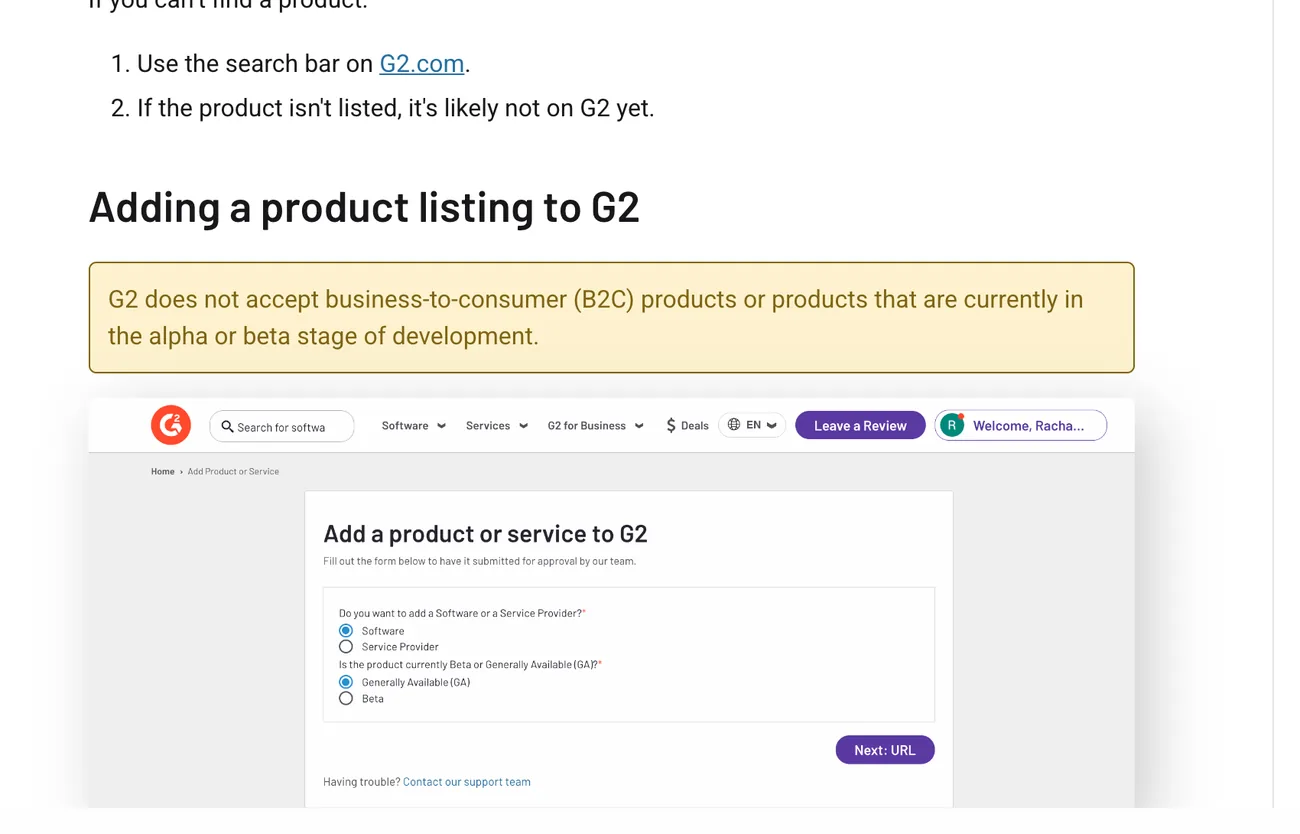
The form asks two qualifying questions up front: software or service, and generally available or beta. If you answer beta, you won't be listed. Wait until you have paying business customers using a released version.
Step 2: search before you submit
Search G2 for your product name and your domain. G2 creates profiles from reviews and research, so you might already have an unclaimed profile. Submitting a duplicate slows everything down. If you find yours, skip to Step 4.
Step 3: fill in the Product Submission Form
Have these ready:
- Product name and website, exactly as on your site.
- Company name and HQ.
- A short and a long description. Lead with the buyer and the job. G2 shows the short version in category grids.
- Category suggestions. G2's research team makes the final call, but suggest the most specific category you'd compete in. A narrow category where you can rank beats a giant one where you're #400.
- Pricing model, deployment and integrations.
G2's research team then reviews the submission and sets the category. G2 doesn't publish a fixed timeline for this step.
Step 4: claim the profile through my.G2
Once the profile exists, open it, hover over Unclaimed and choose Claim this profile. You'll be asked to sign in to my.G2.
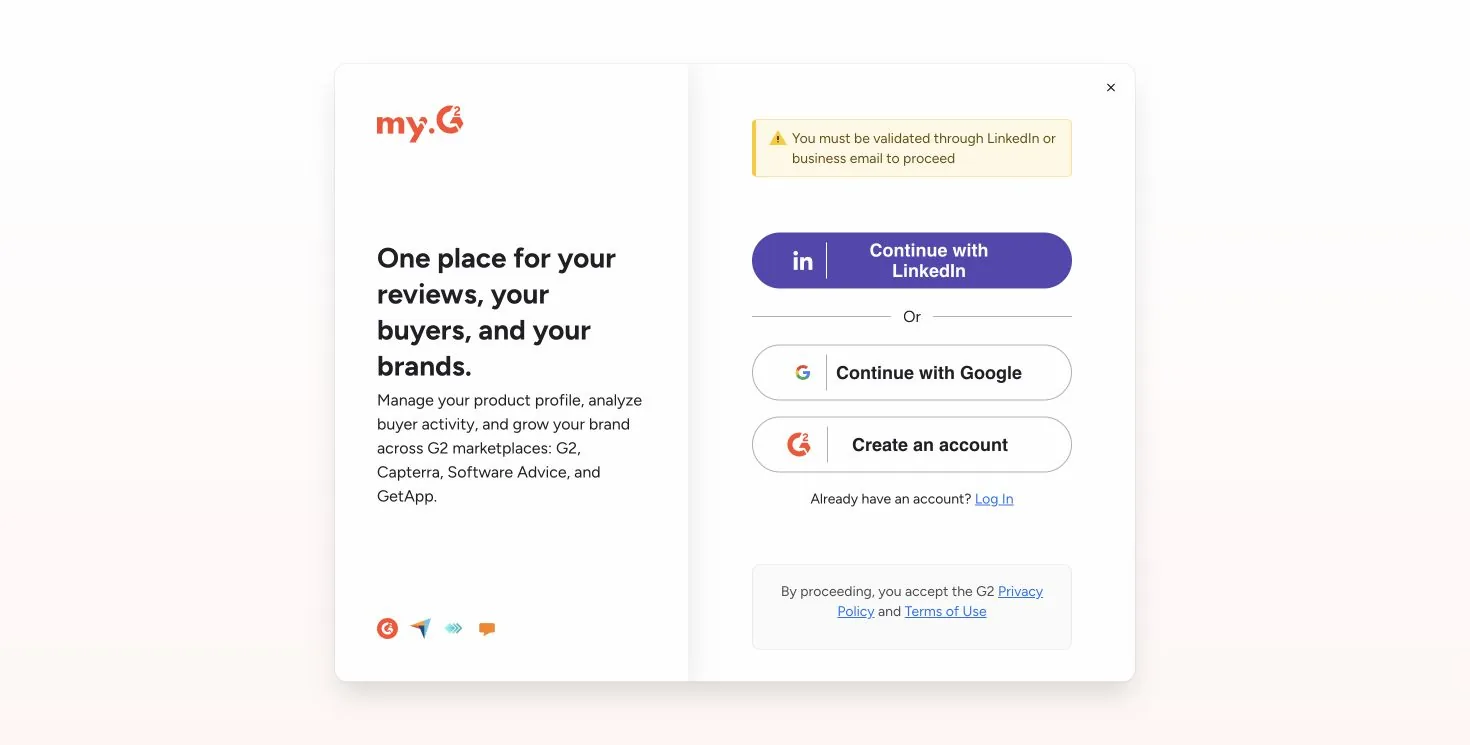
Use your work email on your company domain. Gmail won't validate as the vendor. G2 then reviews the claim and gives final approval within 1–3 business days. Note the my.G2 screen: it now describes managing your brand "across G2 marketplaces: G2, Capterra, Software Advice, and GetApp".
Step 5: build the profile, then get reviews
A claimed profile with zero reviews doesn't show up anywhere useful. G2's category grids and rankings are driven by reviews: how many, how recent, and how satisfied.
- Complete the profile: screenshots, a demo video, features, integrations, pricing, and the competitors you replace.
- Get 10 reviews in the first month from real business users. Our review playbook has a 3-week plan that stays within G2's rules: no paying customers yourself, and no only asking the happy ones.
- Reply to reviews, including critical ones. Buyers read the replies.
Ten good reviews make you eligible for G2's seasonal reports and badges in a niche category, and those badges do convert on landing pages.
Does G2 give you a backlink?
Not in a way that helps SEO. On Linear's G2 reviews page, which we opened in a browser on 5 October 2026, there was no clickable link to linear.app at all: the "Website" section shows a description, not a link. Our earlier catalog check recorded G2 profile links as nofollow where they did appear.
That isn't a reason to skip G2. The value is that buyers comparing tools in your category will find your profile, and that G2 pages rank for your competitors' names. Count it as a buyer channel, not a link.
How the big B2B review sites compare
| Site | DR | Visits/month | Free profile | Link to your site (our check, 5 Oct 2026) | Paid options |
|---|---|---|---|---|---|
| G2 | 91 | ~2.25M | Yes | No clickable link on the profile we checked | Profile upgrades, buyer intent |
| TrustRadius | 85 | ~290K | Yes | CTA buttons only on paid profiles (followed on the ones we saw) | Premium profile |
| SoftwareSuggest | 77 | ~358K | Yes | "Visit Website" buttons are sponsored nofollow ad links |
Gold, Platinum, pay per lead |
| SaaSworthy | 75 | ~220K | Yes | No link on the pages we could check | Placements, lead targeting |
| SaaS Browser | 74 | ~13K | Claim | "Visit" goes through a nofollow redirect |
Data plans |
| SourceForge | 93 | ~22.5M | Yes | No direct link on the business listing we checked | Promotion |
| Crunchbase | 91 | ~3.2M | Yes | nofollow |
Pro data subscription |
None of the big review sites hands free profiles a followed link. If links are a goal, use launch platforms and directories with clear rules, see dofollow directories for startups.
Free vs paid
The free profile gets you listed, reviewable and comparable. G2's paid plans add profile customisation, CTAs, buyer-intent data (which companies are researching your category) and more. For a startup, free plus reviews is the right first step. Buy intent data only once you have a sales team that will act on it.
Is G2 worth it?
For B2B SaaS, yes. It's the review site enterprise buyers check first, it ranks for "[competitor] alternatives" searches, and reviews there carry weight. It's not an SEO link (nofollow) and not a launch, so don't expect a traffic spike. Expect slow, high-intent discovery that compounds with reviews.
Pros and cons
Pros
- Free profile on the B2B review site buyers check first.
- One login now covers G2, Capterra, GetApp and Software Advice.
- Badges and grid placement convert well once you qualify.
- Pages rank for competitor and alternatives searches.
Cons
- No B2C or beta products.
- Nothing happens without reviews, and reviews take effort.
- No useful SEO link on free profiles.
- Paid plans are expensive for an early startup.
Common mistakes on G2
- Submitting a duplicate. Search for an unclaimed profile first.
- Claiming with a Gmail address. Use your company domain or LinkedIn.
- Picking a huge category. A narrow category is where a young product can reach a grid.
- Asking only happy customers. G2 watches for selective review gathering. Ask everyone in a cohort.
- Paying for intent data too early. It's only useful if someone on your team will act on it every week.
Related
- G2 vs Capterra for software vendors, now under the same owner
- B2B software review sites: which to do first
- TrustRadius, SoftwareSuggest and SaaSworthy
- AgentLaunch's catalog, which flags eligibility rules like G2's B2B-only policy before you spend time on a form
FAQ
Is it free to list on G2? Yes. A basic G2 profile is free. Paid plans add features and buyer-intent data.
How long does G2 take to approve a listing? G2 doesn't publish a timeline for new product submissions. Claiming an existing profile gets final approval within 1–3 business days.
Can I list a B2C or beta product on G2? No. G2 only accepts B2B products that are generally available.
Does G2 give a backlink?
Not a useful one. The G2 profile we checked had no clickable link to the vendor's site, and earlier checks found nofollow where links appeared.
Does G2 own Capterra? G2 announced in January 2026 that it was buying Capterra, GetApp and Software Advice. my.G2 now manages profiles across all four.
How many reviews do you need on G2? Enough to qualify for your category's grid and seasonal reports. Ten genuine reviews in a niche category is a realistic first goal.