Field notes
How to Measure Directory and Launch Referral Traffic (UTMs + GA4)
How to measure directory and launch referral traffic: a UTM scheme, which directories already tag your link (and which reject UTMs, like Product Hunt), GA4 steps, capturing the source at sign-up, and a five-row monthly report.
To measure directory and launch referral traffic, tag every listing URL with UTM parameters using one consistent scheme (utm_source=uneed&utm_medium=directory&utm_campaign=launch_oct_2026), then look at Reports → Acquisition → Traffic acquisition in Google Analytics 4, broken down by Session source / medium. Because many directories strip query strings, also check raw referrers for the directory's domain. Then go past visits: track sign-ups and activation by source so you know which listings sent customers.
Here's the UTM scheme, the GA4 setup, the referrer fallback, and a simple monthly report.
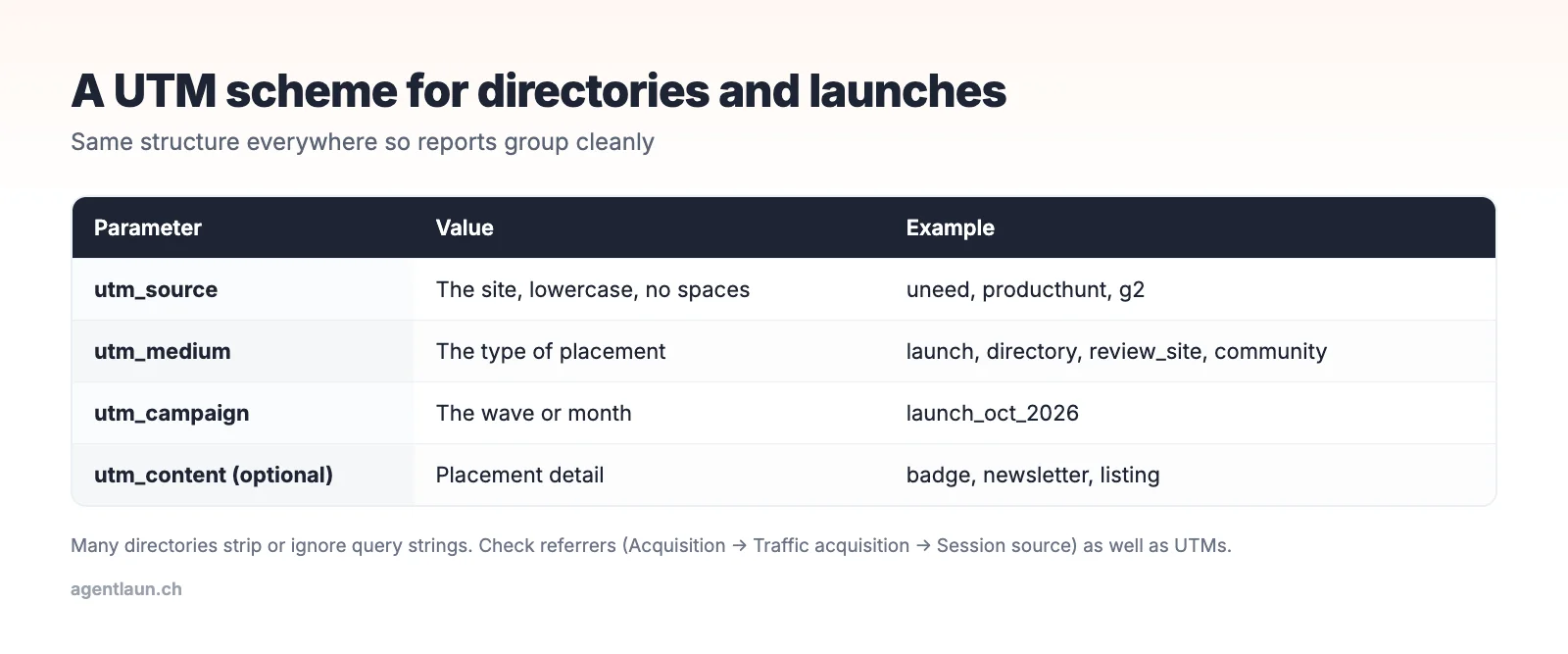
Step 1: a UTM scheme you'll stick to
| Parameter | Rule | Examples |
|---|---|---|
utm_source |
The site, lowercase, no spaces | uneed, producthunt, g2, saashub |
utm_medium |
The type of placement | launch, directory, review_site, community, newsletter |
utm_campaign |
The wave or month | launch_oct_2026, directories_q4 |
utm_content (optional) |
Placement detail | badge, listing, sidebar |
Example: https://yourapp.com/?utm_source=uneed&utm_medium=launch&utm_campaign=launch_oct_2026
Keep the scheme in your submission tracker next to each listing, so the link you submitted is on record.
Many directories tag your link for you
Before you add UTMs, check what the directory already does. When we inspected the outbound product links on live listings in October 2026, most launch platforms appended their own tracking parameter, and some reject your UTMs outright:
| Directory | What it adds to your link (parameter names we saw) | Can you add your own UTMs? |
|---|---|---|
| Product Hunt | ref=producthunt |
No: its URL field rejects tracking and shortened links |
| Fazier | ref (value fazier) |
Yes |
| TinyLaunch | ref |
Yes |
| StartupBase | ref |
Yes |
| Microlaunch | ref |
Yes |
| DevHunt | ref |
Yes |
| Uneed | ref and ref_type |
Yes |
| PeerPush | utm_source and ref |
You can, but theirs may overwrite or duplicate yours |
| Launch Llama | utm_source, utm_medium, utm_campaign |
You can, but theirs may overwrite or duplicate yours |
| SoftwareSuggest | Its own utm_ss on ad links |
Not on free listings |
| G2, Crunchbase, SourceForge, Peerlist | Nothing (or no direct link) | Where there's a link field, yes |
What this means in practice:
- For
ref-style tags, filter your analytics on the landing page URL containingref=fazier,ref=producthuntand so on. Add a GA4 custom dimension or an exploration filter for therefquery parameter so you can group them. - Where the directory sets its own
utm_source, yours may be overwritten or doubled up. Rely on theirs, and note in your tracker which source name each directory uses. - Where there's no link at all (G2's free profile, SourceForge business listings), measure branded search and direct visits after the listing goes live instead.
Step 2: read it in GA4
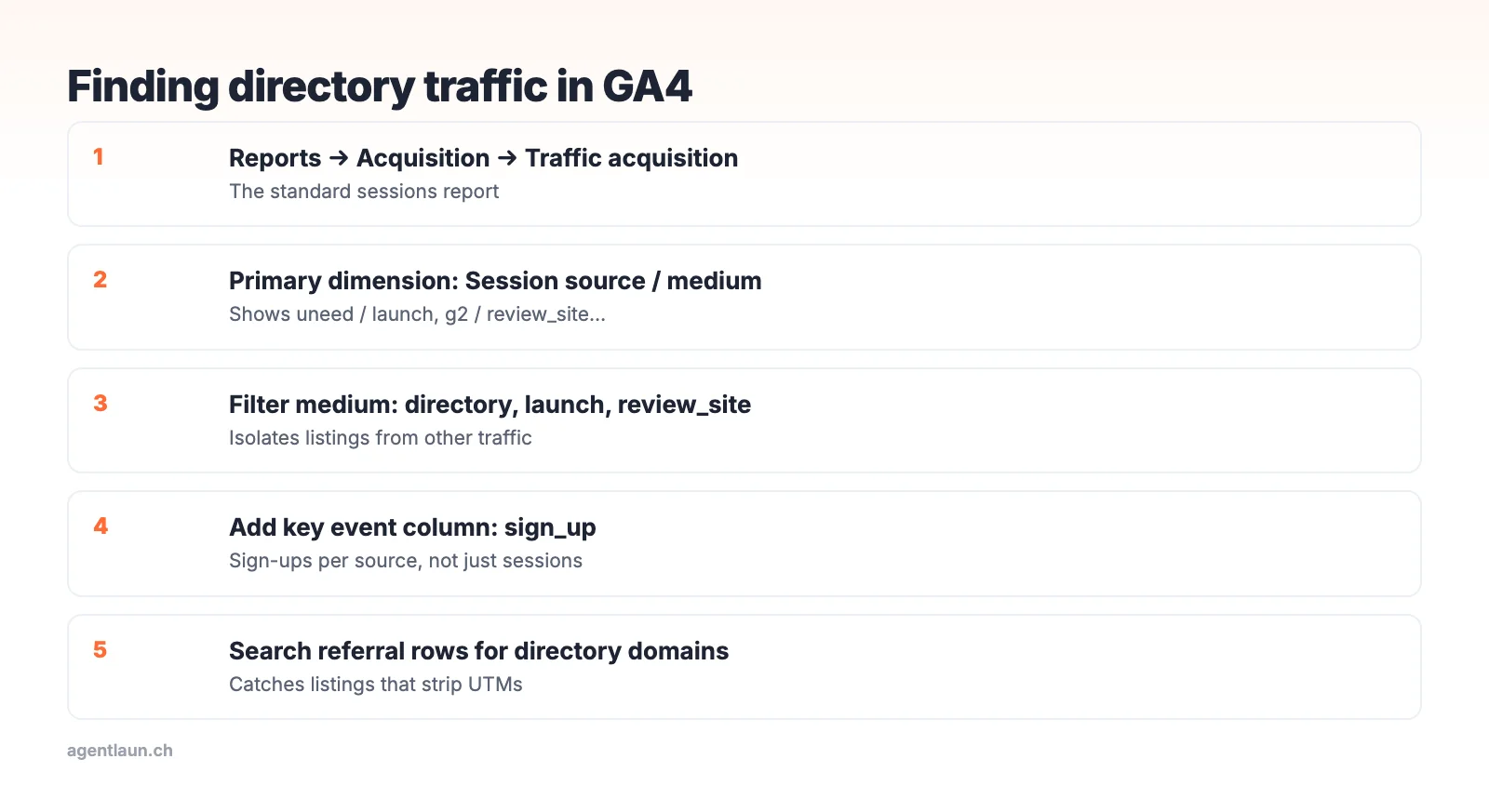
- Reports → Acquisition → Traffic acquisition
- Change the primary dimension to Session source / medium
- Add a filter:
Session mediumcontainsdirectory,launchorreview_site - Add a comparison or secondary dimension for Session campaign
For conversions, mark your sign-up event (for example sign_up) as a key event, then add it as a column. You'll see sign-ups per directory, not just sessions.
Step 3: the referrer fallback
Many directories rewrite or strip your URL, add their own parameters, or send traffic through a redirect. Those visits show up as referral with the directory's domain as the source (for example uneed.best / referral), with no UTM. Search Traffic acquisition for the domain as well as your UTM source. Some sites send no referrer at all, and their traffic lands in (direct).
Step 4: measure what matters
Visits are the least useful number. For each source, track:
| Metric | Where |
|---|---|
| Sessions | GA4 Traffic acquisition |
| Sign-ups (key event) | GA4 with a key-event column |
| Activated users | Your product analytics or database, joined on first-touch source |
| Paid conversions | Billing data joined on first-touch source |
Store the first-touch utm_source on the user record at sign-up (read it from the landing URL or a cookie). That one field lets you answer "which directory sent paying customers?" months later.
Capture the source at sign-up
Analytics tools sample, block and expire. The most reliable attribution is a field on your own user record:
- On the first page view, read
utm_source,refanddocument.referrer, and keep them in a first-party cookie or localStorage for 30 days. - When the user signs up, save those values on the account (
first_touch_source,first_touch_ref,first_touch_referrer). - Normalise them into one
sourcefield:ref=producthuntandutm_source=producthuntboth becomeproducthunt. - Report signups, activations and paying customers by
sourceeach month.
That's about 30 lines of code, and it answers "which directory sent customers" even when GA4 doesn't.
A monthly report in five rows
| Source | Sessions | Sign-ups | Activated | Paid |
|---|---|---|---|---|
| uneed / launch | 340 | 22 | 9 | 2 |
| g2 / review_site | 85 | 11 | 7 | 3 |
| … |
(Illustrative numbers.) The point: some listings send lots of visits and no customers, and others send a trickle of buyers. Renew, pay for, or put effort into the latter.
Don't forget the SEO side
Referral traffic is only half the value of many listings. The other half is the backlink. Check the link attribute on each live listing (how) and track your Domain Rating over time with our DR checker.
The GA4 steps
Save this as an exploration or a comparison so you can reopen it monthly. If your sign-up happens on a different subdomain (app.yourproduct.com), make sure cross-domain measurement is configured. Otherwise the session that signs up looks like a new direct visit, and every directory gets less credit than it earned.
Attribution pitfalls
- Long gaps: someone finds you on a directory, comes back a week later via Google search, and signs up. Last-click reports credit Google. Storing first-touch source at sign-up fixes this.
- Link previews and bots: some directories and chat apps pre-fetch links, creating sessions with zero engagement. Filter on engaged sessions.
- Self-referrals: your own payment or auth provider can show up as a referrer if it isn't excluded. Add Stripe, Paddle or your auth domain to GA4's unwanted referrals list.
- Launch-day spikes: compare weeks, not days. One directory's 300-visit day can hide another's steady 20 visits a day that convert better.
Related
- Why launch traffic doesn't convert
- How to track directory submissions
- SaaS directory submission checklist
FAQ
How do I track traffic from directories? Submit UTM-tagged URLs, read them in GA4 under Traffic acquisition by Session source / medium, and check raw referrers for directories that strip parameters.
Why does directory traffic show as direct? Some directories send no referrer and strip UTM parameters, so the visit lands in (direct).
What should I measure from directory listings? Sign-ups, activated users and paid conversions by source, not just visits.
Does Product Hunt allow UTM links?
No. Product Hunt's URL field rejects tracking and shortened links. It adds ref=producthunt to outbound clicks instead, which you can filter on.
Which directories add their own tracking to my link?
Most launch platforms do. In our October 2026 checks, Fazier, TinyLaunch, StartupBase, Microlaunch, DevHunt and Uneed added a ref parameter, and PeerPush and Launch Llama added their own utm_source.