Vibe coding growth guidesSEO and backlinks
Lovable Sitemap and Google Search Console: Step-by-Step Setup Guide (2026)
Create or fix a Lovable sitemap.xml and robots.txt, verify your domain in Google Search Console, submit the sitemap, request indexing and add Bing and IndexNow.
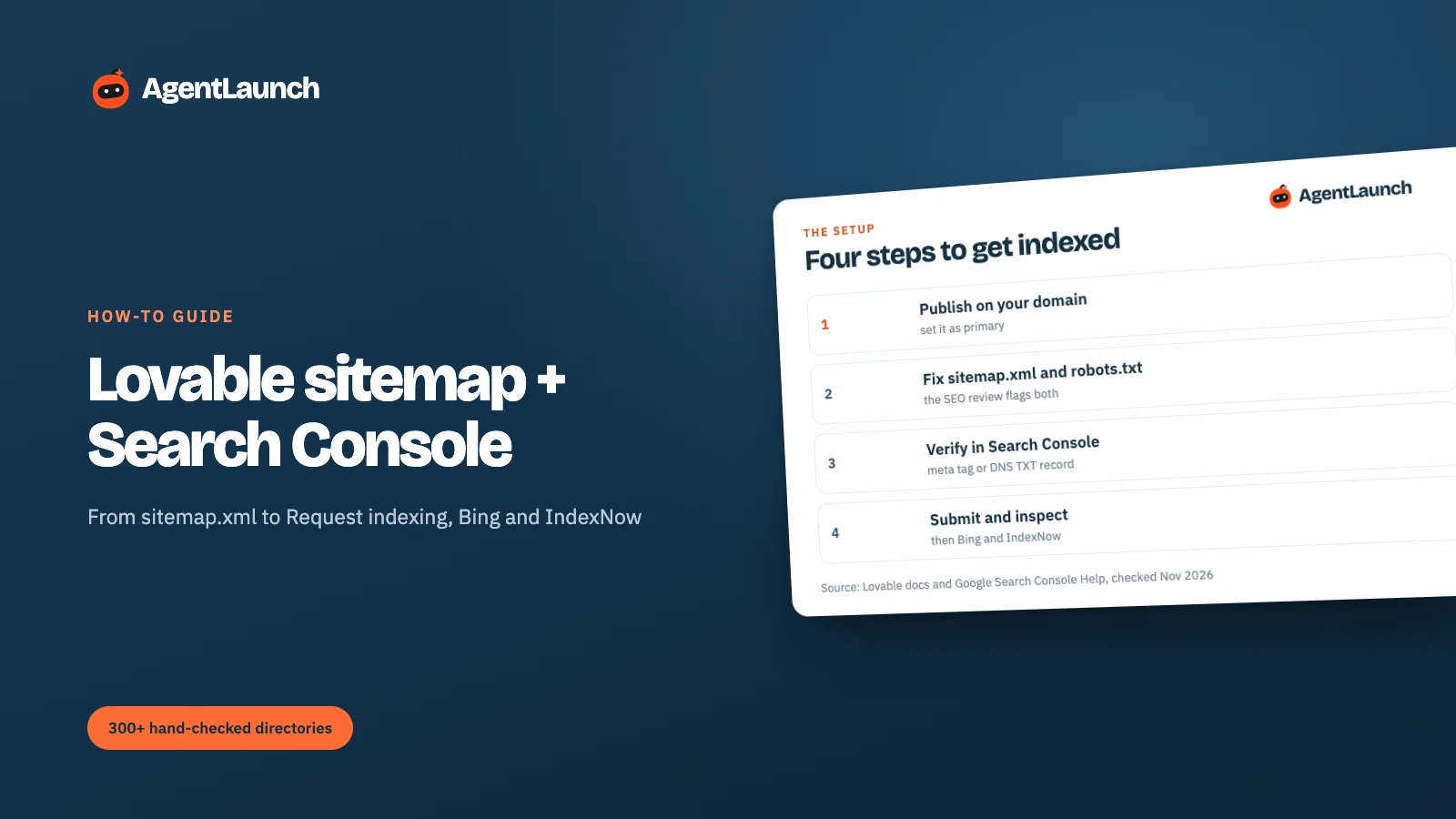
 By Pruthvi RajNovember 23, 2026
To set up a Lovable sitemap and Google Search Console, make sure yourdomain.com/sitemap.xml lists your public pages, verify the domain in Search Console, then submit that sitemap URL.
Quick answer:
- Publish publicly and set your custom domain as primary.
- Run the SEO & AI search review and fix any Add a sitemap or Crawler rules finding.
- Verify in Search Console with Lovable's connector or a DNS TXT record.
- Submit the sitemap, then request indexing for your key pages.
- Import the site into Bing Webmaster Tools and add IndexNow.
As of November 2026, Lovable's Search Console connector can verify the site and submit the sitemap from chat. Requesting indexing, Bing and the not-indexed reports are still on you.
What you'll need
| What | Time | Cost |
|---|---|---|
| Published Lovable project | Done | Publishing uses no credits |
| Custom domain set as primary | 15 min + DNS wait | Paid plan + registrar fee |
| SEO & AI search review | 10 min | Free to run, fixes use credits |
| Google account for Search Console | 2 min | Free |
| DNS access, for a Domain property | 10 min + up to 3 days | Free |
| Microsoft account for Bing | 5 min | Free |
Step 1: Publish on the domain you want indexed
Only publicly published apps can appear in search, per Lovable's SEO and AEO docs. Unpublished projects, restricted ones and branded workspace URLs never show up.
A lovable.app address can be indexed, but you want search presence on a domain you own.
- Connect your domain in Project → Settings → Domains and set it as primary. Our Lovable custom domain guide has the DNS records.
- Open your
lovable.appaddress and confirm it redirects to the custom domain. - Publish your latest changes. Google reads the sitemap from the live site.
Lovable redirects other addresses to the primary domain with a 302, so your sitemap and canonicals must use the custom domain only. The Lovable SEO guide explains why.
Step 2: Create or fix your Lovable sitemap.xml
Open https://yourdomain.com/sitemap.xml in a browser. Lovable creates a robots.txt for every new project, but not always a sitemap.
Let the review create or repair it
Open More → Analytics → SEO & AI and run the review. You'll see Add a sitemap or Sitemap needs attention if the file is missing, invalid, lists placeholder or relative URLs, or points to another host.
Click Try to fix, publish, then click Scan again. You can also ask in chat:
Create a sitemap.xml that lists every public page on https://yourdomain.com with absolute URLs and a lastmod date. Leave out login, dashboard and settings pages.
Rescan whenever you add or remove pages.
What a correct sitemap looks like
<?xml version="1.0" encoding="UTF-8"?>
<urlset xmlns="http://www.sitemaps.org/schemas/sitemap/0.9">
  <url>
    <loc>https://yourdomain.com/</loc>
    <lastmod>2026-11-20</lastmod>
  </url>
</urlset>
Google's sitemap guidelines add a few rules:
- Use absolute URLs on your custom domain, never
lovable.app. - Google ignores
<priority>and<changefreq>. It uses<lastmod>only when it's consistently accurate. - List public pages only. A page behind a login can't be crawled.
Step 3: Check your Lovable robots.txt
Open https://yourdomain.com/robots.txt. One that allows everything and points to your sitemap looks like this:
User-agent: *
Allow: /

Sitemap: https://yourdomain.com/sitemap.xml
Check three things:
- The
Sitemap:line uses the full URL on your custom domain. Google doesn't guess http, https or www versions. - Nothing important is disallowed. Lovable's review rates a robots.txt that blocks crawlers on a live site as high impact. A missing or wrong
Sitemap:line shows as Crawler rules need attention. - You're not using robots.txt to hide pages. Google says it doesn't keep pages out of search. Use
noindexor a login for that.
Step 4: Verify your Lovable site in Google Search Console
Pick one of two options, or do both.
Option A: let Lovable verify it with a meta tag
A workspace admin or owner connects the connector once:
- Go to Connectors, select Google Search Console and click Connect.
- Enter a Display name, like
GSC Prod. - Under Advanced settings, keep the verification scopes selected. Verification and sitemap submission need them.
- Click Connect, choose your Google account and click Allow.
Then click Try to fix on the Google Search Console isn't fully set up finding. Or prompt:
Use Google Search Console and verify ownership of https://yourdomain.com, then add it to Search Console.
Per the connector docs, Lovable then adds a google-site-verification meta tag to the <head>, publishes with your approval, verifies and adds the property.
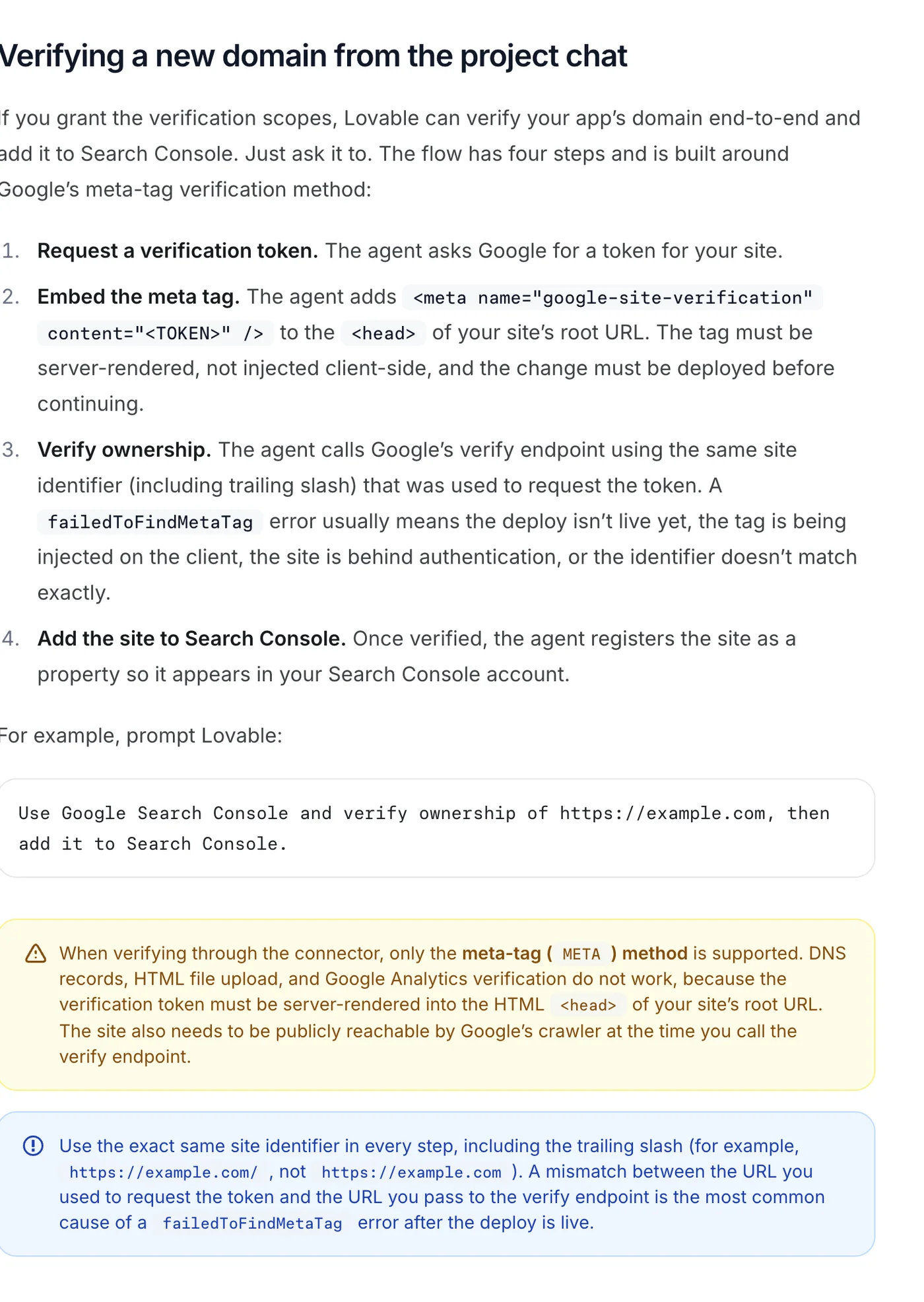
If you see failedToFindMetaTag, the usual causes are a deploy that isn't live, a tag injected on the client, a login wall or a URL mismatch. Use the exact same URL every time, trailing slash included.
Option B: verify a Domain property with a DNS TXT record
The connector can't do DNS verification, so do this in Search Console. These steps follow Google's verification help:
- Click + Add property in the property selector and choose Domain. Enter
yourdomain.comwith nohttps://. - Choose TXT and copy the
google-site-verification=...string. - At your DNS provider, add a TXT record with Host/Name blank or
@and the string as Value. For a domain bought through Lovable, use Workspace settings → Workspace domains → Advanced → DNS records. - Click Verify. A new record can take up to two or three days to show, so retry a day later if it fails.
- Leave the record in place, or you lose verification.
Domain property or URL-prefix property?
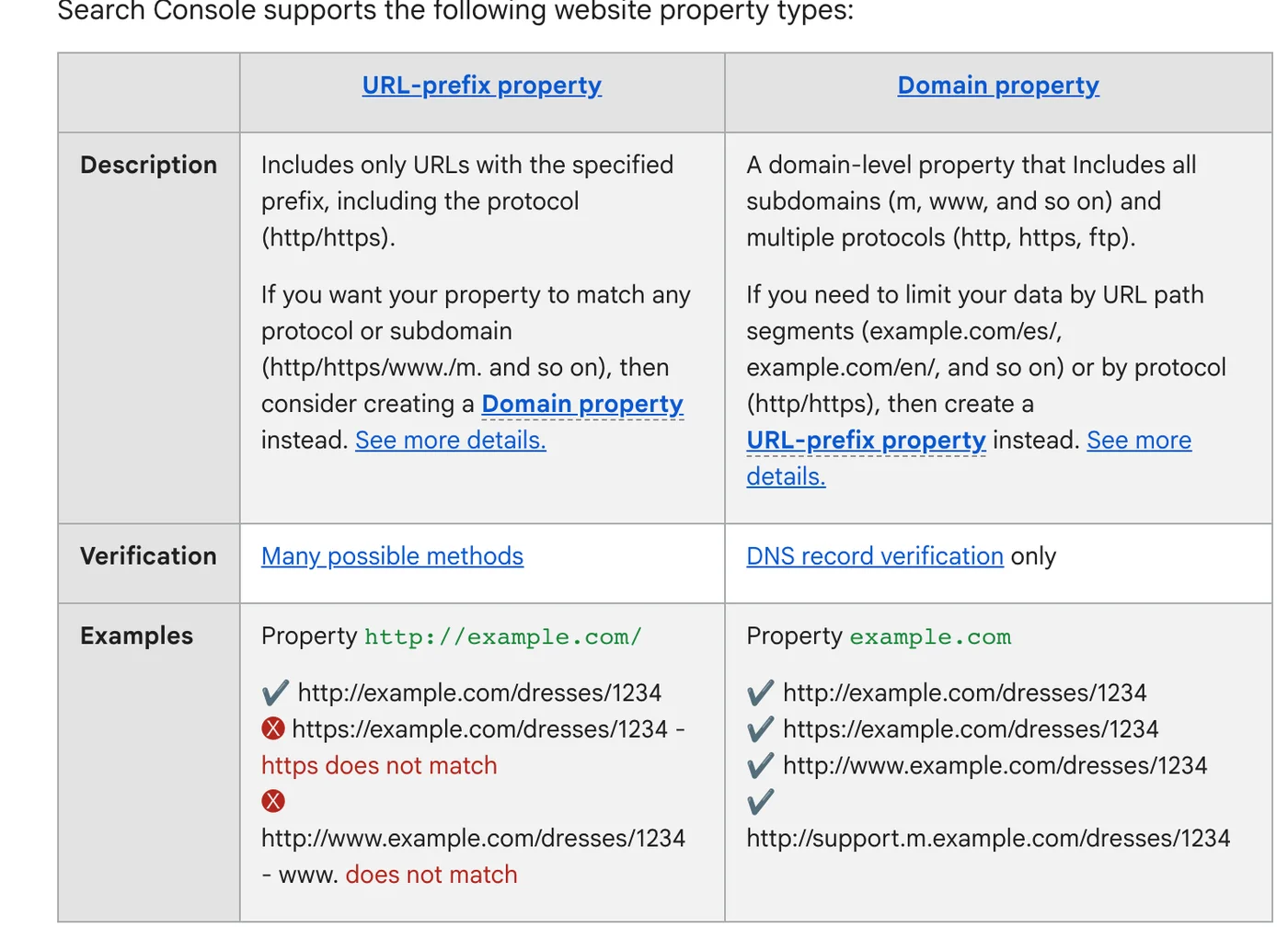
A Domain property covers every subdomain and protocol but only verifies by DNS. A URL-prefix property covers one exact address and allows the HTML tag Lovable's connector uses.
Our pick is a Domain property if you can edit DNS, since it catches every version of your site. You can keep both.
Step 5: Submit your Lovable sitemap in Search Console
These steps come from Google's Sitemaps report help:
- Confirm you're an owner of the property.
- Inspect the sitemap URL and run a live test. Page fetch should say Successful.
- Open Sitemaps, paste the full URL into Add a new sitemap and click Submit.
- Check the status: Success, Has errors or Couldn't fetch.
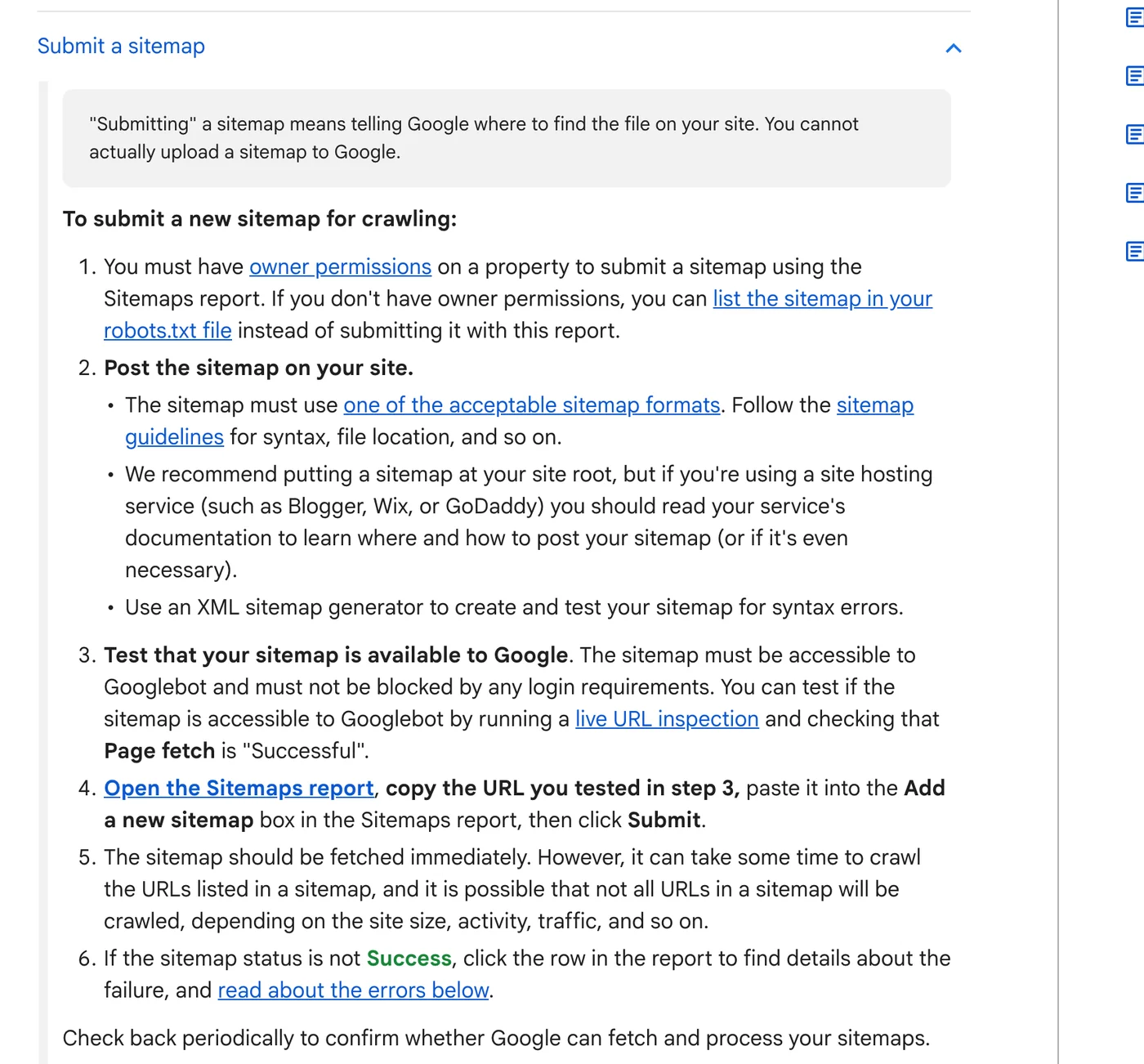
Two details catch Lovable users:
- The report doesn't follow redirects. Submit the URL on your primary domain, not
lovable.app. - Sitemaps don't carry across properties. One submitted under
www.yourdomain.comwon't appear underyourdomain.com.
With the connector, you can ask Submit my sitemap to Google. once you've published.
Step 6: Inspect key URLs and request indexing
Lovable's connector can inspect URLs, but it can't request indexing. Do this part in Search Console.
- Paste a full URL into the URL Inspection bar at the top.
- Click Test live URL, then View tested page and the Screenshot tab. If your content shows, Google can render the page.
- Click Request indexing.
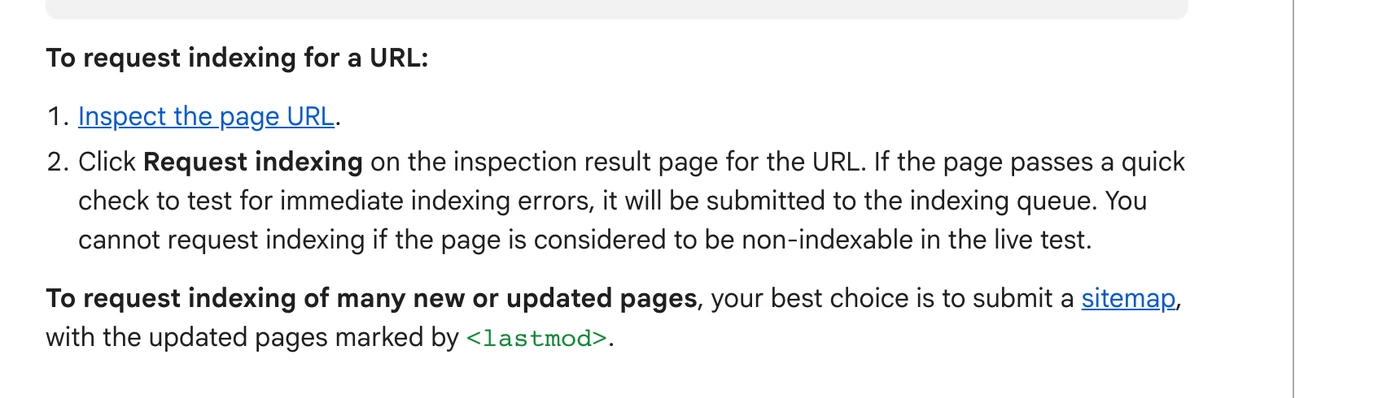
Google caps indexing requests per day and doesn't publish the number. Spend them on your homepage, pricing page and top use-case pages. The sitemap covers the rest.
"URL is on Google" means the page is eligible. It doesn't mean it shows for any search.
Step 7: Add Bing Webmaster Tools and IndexNow
Import your site from Search Console
In Bing Webmaster Tools, open My Sites and click Import. Sign in with your Search Console account, click Allow, select your sites and click Import.
Imported sites are verified automatically, and their sitemaps come across.
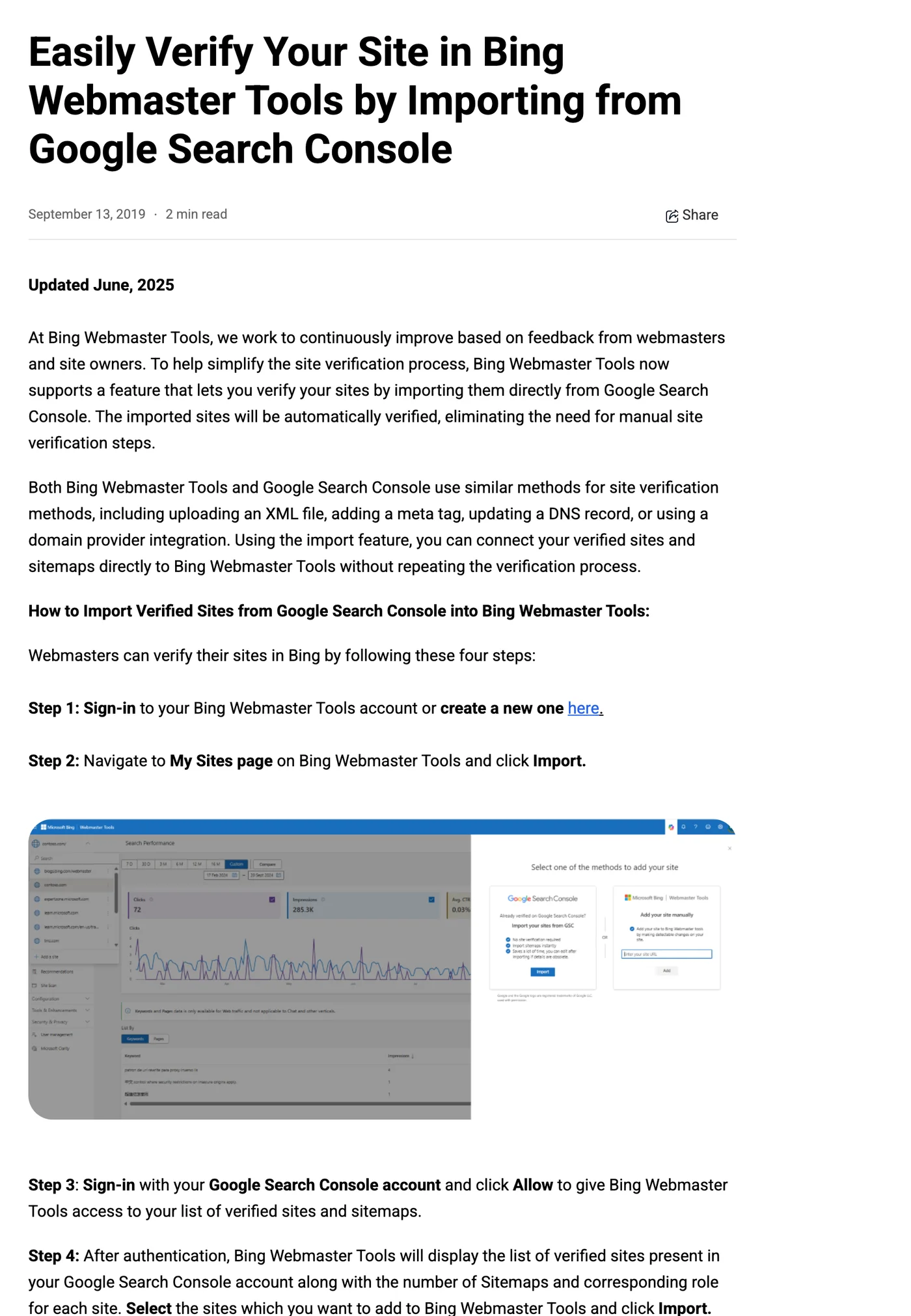
Lovable added a Bing Webmaster Tools connector on 14 October 2026. It can submit URLs and sitemaps for a verified site, but it can't verify a new one, so import first.
Set up IndexNow
IndexNow tells search engines the moment a page changes. The setup, from IndexNow's documentation:
- Create a key of 8 to 128 characters, using letters, numbers and dashes.
- Host a text file named
<key>.txtat your site root that contains only the key. In Lovable, ask:Add a text file at the site root named <key>.txt that contains only <key>.Publish and open the file to confirm it loads. - Send changed URLs to
https://api.indexnow.org/indexnow?url=<url>&key=<key>, or POST up to 10,000 at once.
IndexNow reaches Bing, Yandex, Seznam, Naver, Yep and a few others. Google isn't part of it, so it doesn't replace Steps 5 and 6.
Step 8: Fix "Discovered" and "Crawled - currently not indexed"
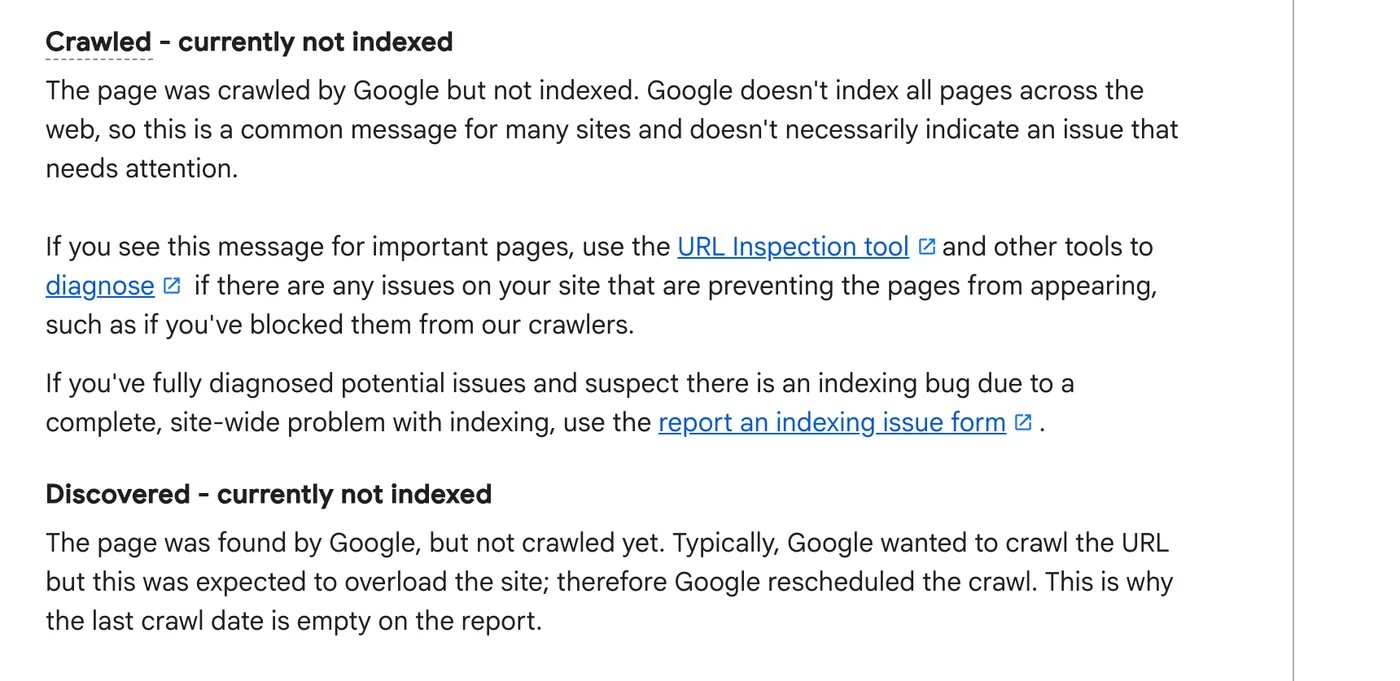
Open Indexing → Pages in Search Console. Google's Page indexing report help defines each status.
| Status | What it means | What to do |
|---|---|---|
| Discovered - currently not indexed | Found, not crawled yet | Link it from your nav, earn outside links |
| Crawled - currently not indexed | Crawled, not indexed, often normal | Check the screenshot, a unique title, a self canonical |
| Page with redirect | Redirecting URL, won't be indexed | Expected for lovable.app, drop it from the sitemap |
| Google chose different canonical | Google picked another URL | Point canonicals at your custom domain |
Lovable's docs say indexing time depends on Google's crawl schedule and your site's authority. A new domain with no links has little authority, which is why pages sit in Discovered.
Internal links help Google find pages. Outside links help it decide they're worth crawling.
Check your baseline on the free DR checker. Then read how to get backlinks for a new website for the first links.
Relevant directory listings are the quickest start, so check which directories fit your app.
If you'd rather not fill in forms, AgentLaunch is an AI agent you run from Claude Code, Codex or Cursor. It submits your product to hand-checked directories and stops only for CAPTCHAs, payments or 2FA.
Step 9: Extra fixes for projects created before 13 May 2026
These projects run on React + Vite with prerendering for verified crawlers. On Enterprise plans the cutoff is 22 June 2026.
- Ignore scanners that say your page is empty. They aren't verified crawlers. Trust the URL Inspection screenshot.
- Late-loading content may be missing from the prerendered copy. Load key text with the page, or upgrade.
- One title and description cover the whole site. Per-page metadata needs TanStack Start.
- Old sitemaps may list
lovable.appURLs or placeholder routes. Rescan and let the review repair it. - Upgrading costs 10–35 credits for most projects. Type
/, choose Migrate to TanStack Start, publish, rescan and resubmit the sitemap.
The Lovable SEO guide covers older projects in more depth. The SEO checklist for vibe-coded apps has the same steps for Cursor, Claude Code and v0.
Common mistakes
- Submitting the
lovable.appsitemap after moving to a custom domain. The report doesn't follow redirects. - Clicking Try to fix and not publishing. Google reads the sitemap from the live site.
- Deleting the DNS TXT record after verification. You lose the property.
- Blocking
/in robots.txt to hide a staging page. Usenoindexinstead. - Verifying only
https://yourdomain.comwhen your primary domain iswww. A URL-prefix property won't cover the other host.
What results to expect
- Verification: minutes with the connector once published. Up to two or three days for a DNS record, per Google.
- Data: Google says data appears in a new property within a few days. Lovable notes it usually lags by a couple of days.
- Indexing: Lovable says new pages can take days, sometimes longer. Google says not every URL in a sitemap gets crawled.
FAQ
Does Lovable create a sitemap automatically?
Not always. It creates a robots.txt for every new project but not always a sitemap. Run the SEO & AI search review and click Try to fix to create one.
How do I submit my Lovable site to Google?
Verify the site in Search Console, then open Sitemaps, enter https://yourdomain.com/sitemap.xml and click Submit. Request indexing for your key pages in URL Inspection.
Why is my Lovable app not indexed?
Check it's published, not on a workspace URL, and not blocked by noindex or robots.txt. If the URL Inspection screenshot shows content, the page likely needs more internal and outside links.
Where is robots.txt in a Lovable project?
At https://yourdomain.com/robots.txt. Ask Lovable in chat to change it, or click Try to fix on a Crawler rules finding.
Can Lovable request indexing for me?
No. Its connector can verify sites, submit sitemaps and inspect URLs, but not request indexing. Use the button in Search Console.
Should I verify lovable.app or my custom domain in Search Console?
Your custom domain, set as primary in Lovable. If you change it later, verify the new one and submit its sitemap again.