Vibe coding growth guidesSEO and backlinks
Lovable SEO: How to Get Your Lovable App Indexed and Ranking (2026 Guide)
Lovable server-renders new apps since 13 May 2026. Here's how to check your project's setup, what the built-in SEO review misses, and the steps that bring traffic.
 By Pruthvi RajNovember 23, 2026
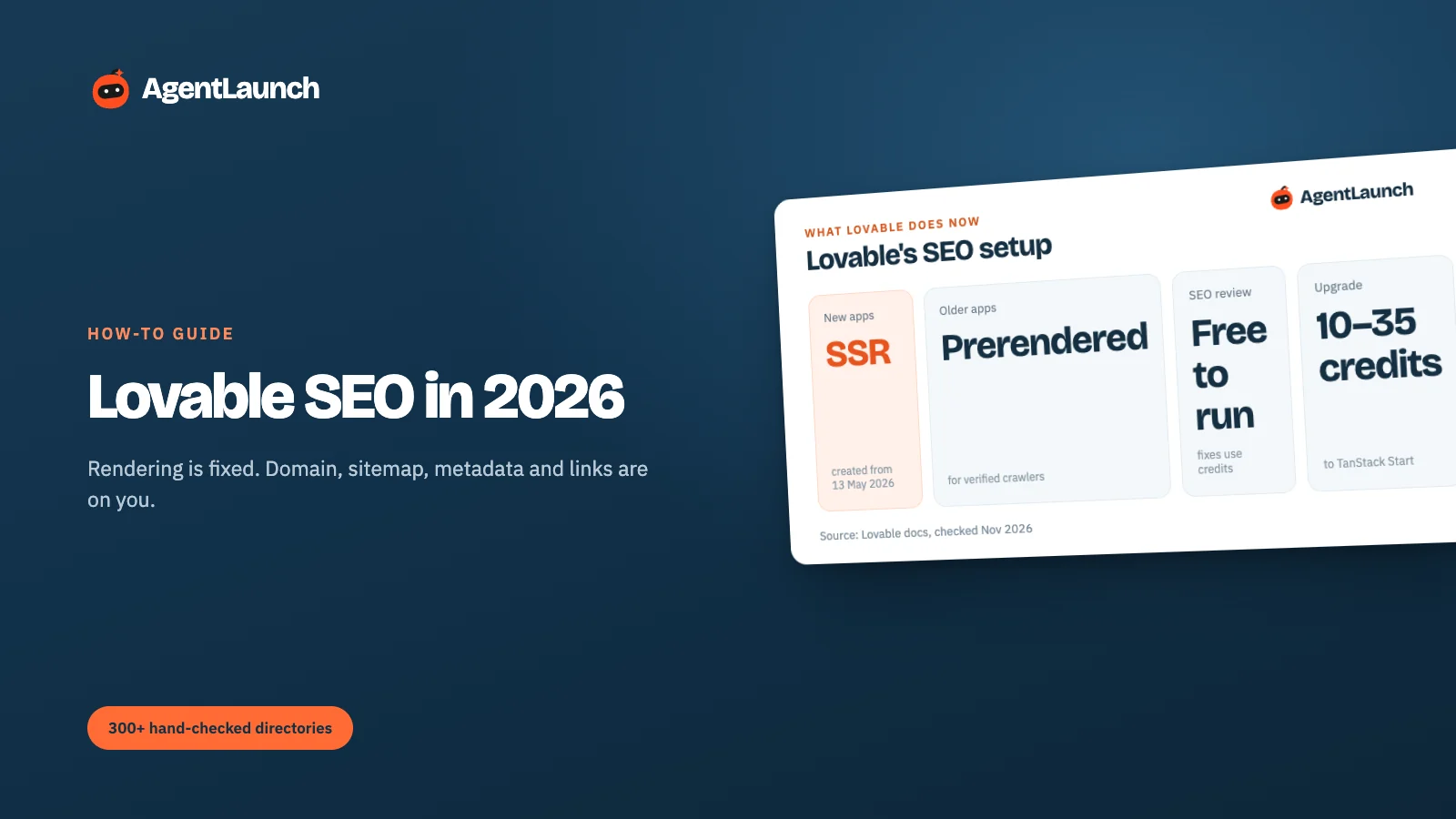
Lovable SEO mostly works out of the box now: since 13 May 2026, new Lovable apps render on the server, and older ones are prerendered for crawlers like Googlebot.
Quick answer:
- Ask Lovable
What stack is this project on?Projects created from 13 May 2026 are server-rendered.- Run the SEO & AI search review (More → Analytics → SEO & AI) and fix what fails.
- Connect a custom domain, make it primary, and submit its sitemap in Google Search Console.
- Give each page its own title and description, and link your pages to each other.
- Earn links from relevant directories and communities. The review doesn't check backlinks.
If your app still gets no Google traffic, rendering is rarely the cause. The usual gaps are no custom domain, an unsubmitted sitemap, one generic title on every page, and no links from other sites.
What you'll need
| What | Time | Cost |
|---|---|---|
| Published, public Lovable project | Done | Publishing uses no credits |
| Lovable paid plan, for custom domains | 5 min | Pro is $25/month |
| Your own domain | 15 min + DNS wait | Registrar fee |
| SEO & AI search review | 10 min | Free to run, fixes use credits |
| Google Search Console | 20 min | Free |
| TanStack Start upgrade, older projects only | A few minutes | 10–35 credits |
| Shortlist of relevant directories | 2–4 hours over weeks | Mostly free |
Plans and features here are as of November 2026.
Step 1: Find out which rendering your Lovable project uses
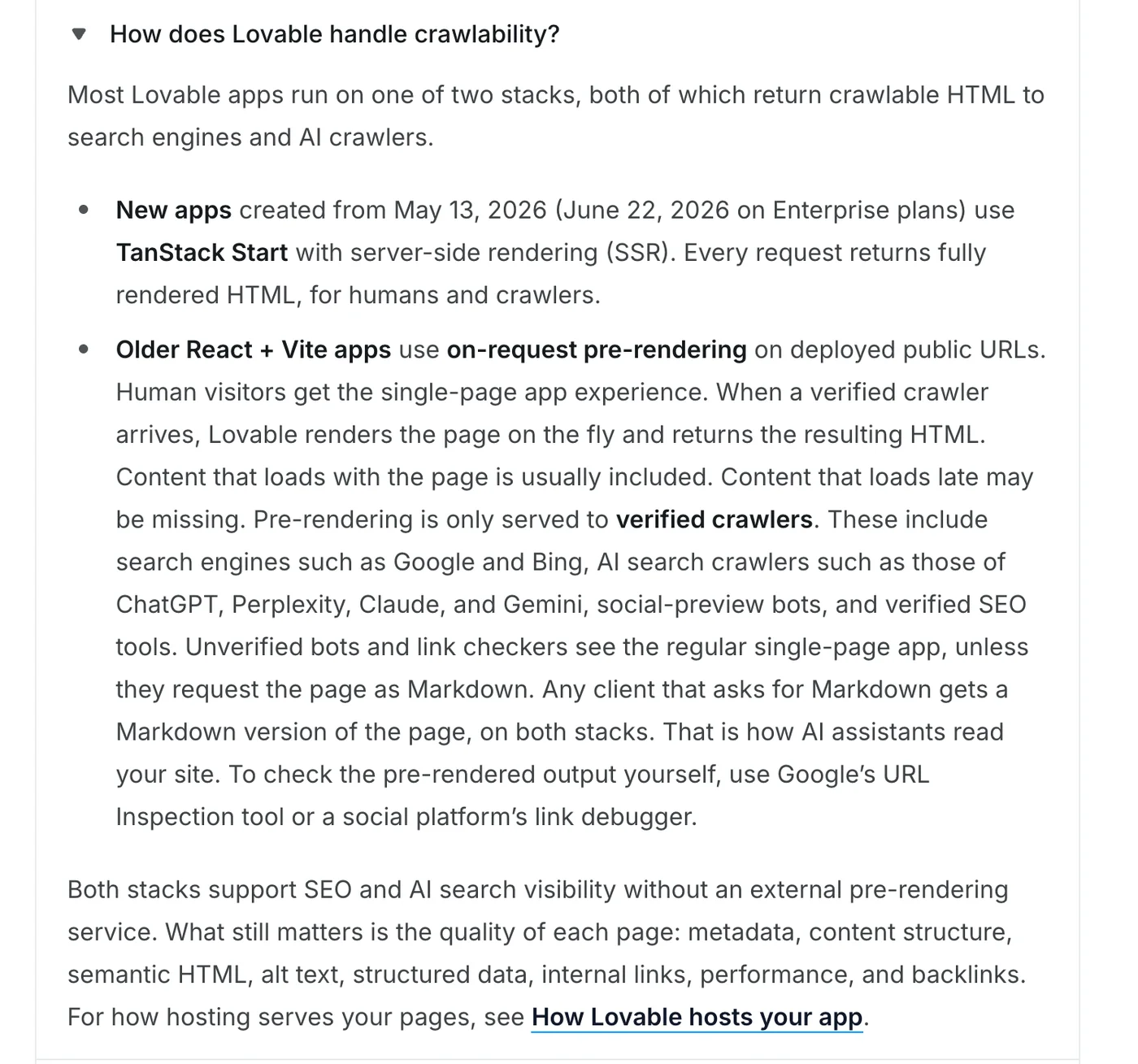
Your next step depends on which of two stacks your project runs on. Lovable's SEO and AEO docs describe both:
- Apps created from 13 May 2026 use TanStack Start with server rendering. Every request returns full HTML. On Enterprise plans the date is 22 June 2026.
- Older React + Vite apps use prerendering. People get the single-page app, and verified crawlers get a rendered copy.
Verified crawlers are Google and Bing, the AI search crawlers of ChatGPT, Perplexity, Claude and Gemini, social preview bots and verified SEO tools.
Three ways to check your stack
- Ask Lovable. Type
What stack is this project on?in the project chat. Lovable's upgrade docs suggest this prompt. - Look for the migrate option. Open Settings → General → Project actions. If Migrate to TanStack Start is listed, you're on React + Vite.
- View the source. Open your live site, press Ctrl+U (Cmd+Option+U in Chrome on a Mac) and search for a homepage sentence. On TanStack Start it's in the HTML. On React + Vite the page is mostly empty.
An empty page source on an older project is not a bug. Browsers get the empty shell, and Google gets the prerendered copy.
Lovable's hosting docs warn that third-party SEO scanners aren't verified crawlers, so they may report your pages as empty. That's why free audits still call Lovable apps invisible. To see what Google gets, use URL Inspection in Step 4.
Should you upgrade an older project?
You don't have to. Lovable says older projects keep working and search engines can still read them. Upgrade if one of these applies:
- You want a different title and description on each page. The metadata docs say older apps carry one set of metadata for the whole site.
- Content loads late, for example after a database call. Prerendering can miss it.
- Link previews look wrong on Slack or LinkedIn.
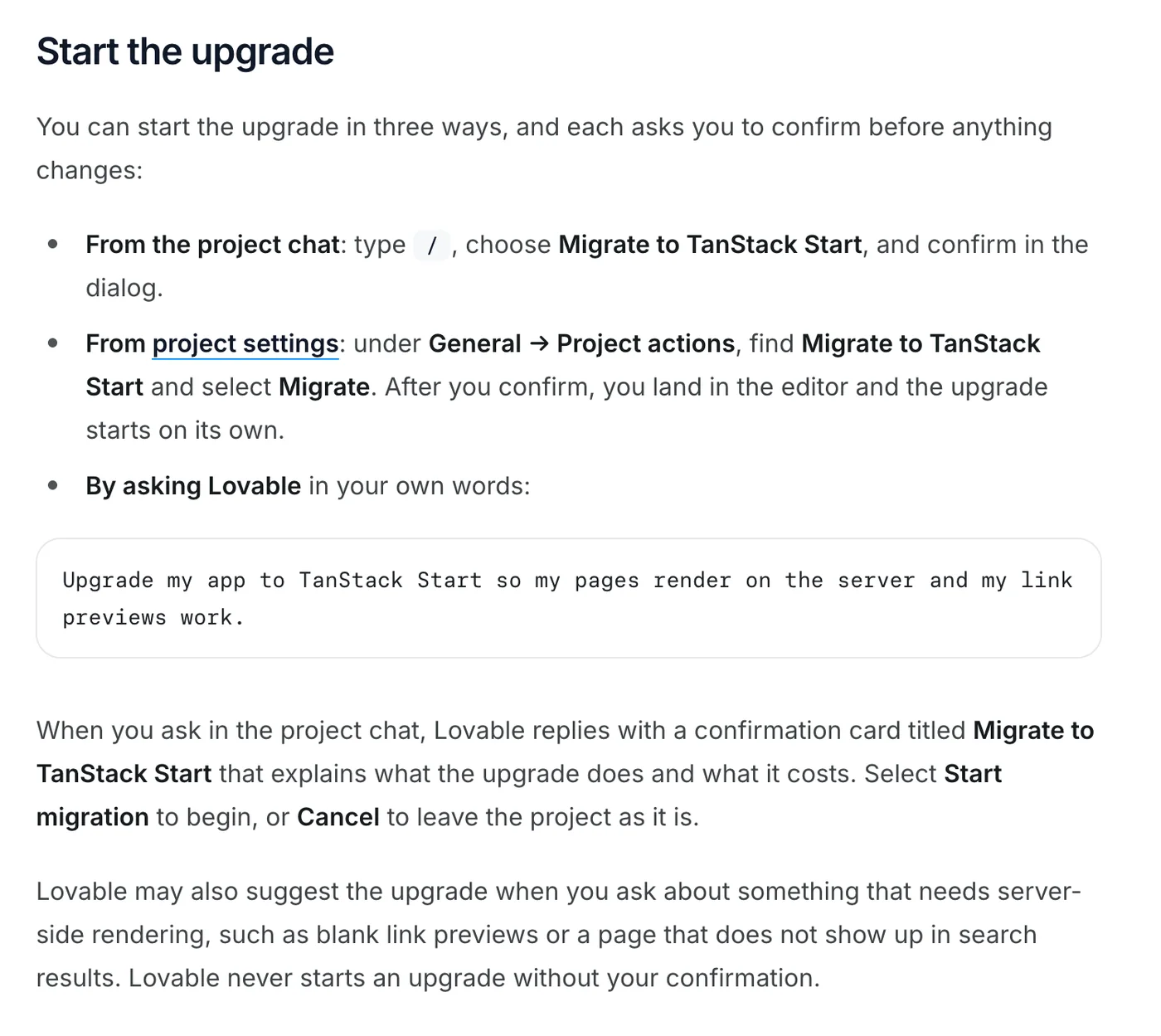
To start, type / in the project chat and choose Migrate to TanStack Start. You can also use Settings → General → Project actions → Migrate.
The upgrade docs say most upgrades cost 10 to 35 credits. Your live site keeps the old version until you publish again, and you can revert from version history.
Test every page afterwards. Libraries that only run in the browser can break server rendering.
Step 2: Run the Lovable SEO review and read what it skips
Open More → Analytics in the project toolbar and pick the SEO & AI tab. On a published project, click Run SEO scan.
Running the review is free on all plans. Try to fix and Try to fix all change your files, so they use credits.
After fixing, publish and click Scan again. Three checks only run on the live site: indexing, AI markdown rendering and Search Console setup.
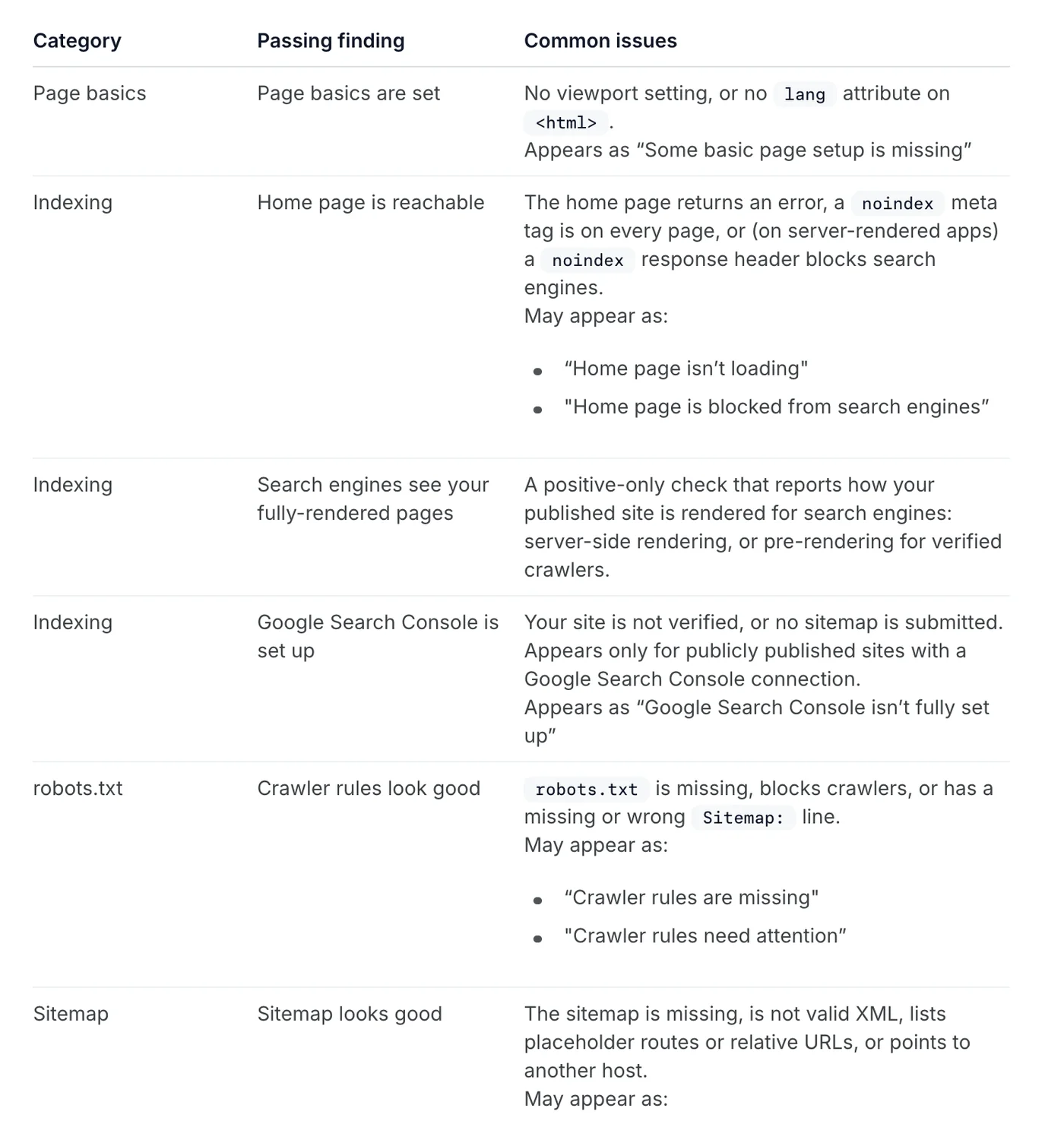
What the review checks
- Page basics: viewport and
lang - Indexing: home page reachable, no sitewide
noindex - Rendering and Search Console setup
- robots.txt and the sitemap
- Metadata: duplicate titles, placeholder text, wrong canonical URLs
- Open Graph tags and structured data
- Content structure: H1, heading order, alt text, link text
- AI readiness
Fix red X findings first. They can hide your whole site, like a noindex tag on every page or a robots.txt that blocks crawlers.
What it doesn't check
The docs also list what the review doesn't fully judge. The big ones are page speed, content quality, search intent, competitor strength and backlink quality.
It no longer runs Lighthouse either, so test speed separately in PageSpeed Insights.
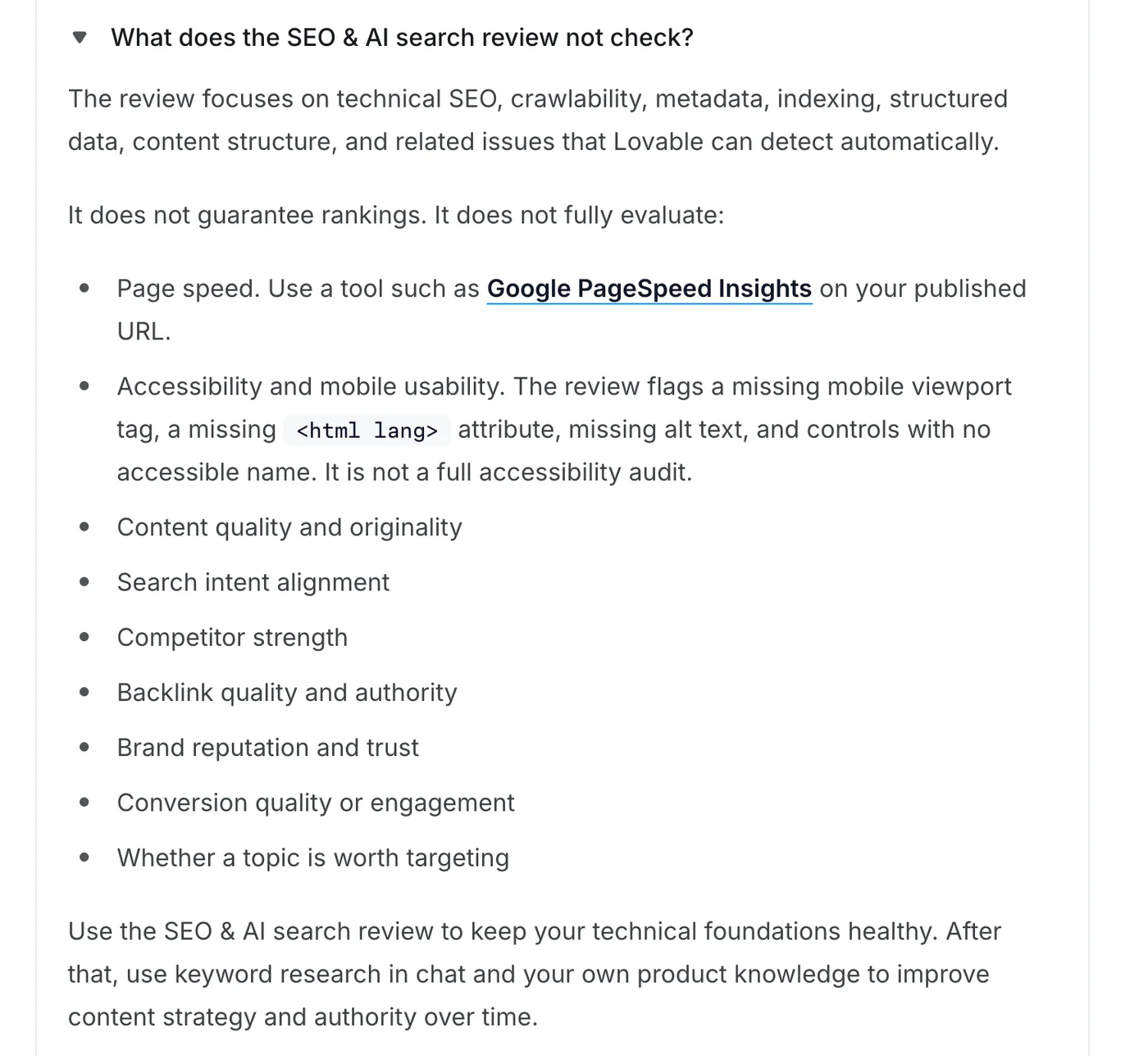
Backlinks are the gap that matters most. Lovable's own docs say your site also needs links from other sites. A clean review on a domain nobody links to ranks for very little.
Semrush research in chat
You can ask Lovable for keyword and competitor research backed by Semrush data, with no Semrush account. Lovable says there are no extra fees for it through 30 November 2026, though normal credits apply.
These prompts come from the docs:
Which keywords should I target next?Which competitors rank for similar products?What backlinks should I try to get?
Semrush can list backlink ideas. Getting the links is still your job.
Step 3: Connect a custom domain and make it primary
A lovable.app address can be indexed. Lovable suggests it mainly for MVPs, demos, internal tools and apps that live on social or paid traffic.
Branded workspace URLs, the app-name.workspace-subdomain.lovable.app kind, never appear in search. Connect your own domain in Project → Settings → Domains and set it as primary.
Watch the 302 redirect
Lovable sends your other addresses, including lovable.app, to the primary domain with a 302 temporary redirect. Its custom domain docs say 301s between project domains aren't supported.
Google's redirect docs say a temporary redirect isn't a signal that the target should be canonical. So don't rely on the redirect alone:
- Point each page's canonical tag at your custom domain.
- Keep
lovable.appURLs out of the sitemap. - Rerun the review after any domain change. Its metadata check flags canonicals that point to the wrong place.
The DNS records and statuses are in our Lovable custom domain guide.
Step 4: Add a sitemap, verify Search Console and inspect a URL
Lovable creates a robots.txt with every new project, but not always a sitemap. The review's Sitemap check fails when the file is missing, isn't valid XML, lists placeholder routes or relative URLs, or points to another host.
Click Try to fix and publish.
Set up Search Console from Lovable
The quickest route is the Google Search Console isn't fully set up finding. Click Try to fix, and Lovable connects its Search Console connector, adds Google's verification meta tag and submits the sitemap.
The connector has two limits. It only supports meta-tag verification, and it can't request indexing.
For a Domain property, Request indexing and the not-indexed reports, use Search Console itself. Every click is in our Lovable sitemap and Google Search Console guide.
Check what Google sees
Paste your homepage URL into URL Inspection and click Test live URL. Then click View tested page and open the Screenshot tab.
If the screenshot shows your content, Google can read the page. Lovable points to this same check for prerendered pages.
Step 5: Give every page its own title, description and share image
Look for template leftovers first. A browser tab that still reads Lovable App, or a description that reads Lovable Generated Project, is text from the template.
Then ask for changes one page at a time:
Update the meta description of the pricing page.
On TanStack Start you can do this per page. On older React + Vite apps one set covers the whole site. That's a strong reason to upgrade if several pages should rank for different searches.
Share previews
For link previews, Lovable recommends:
- Unique
og:title,og:descriptionandog:imagevalues per route - Images at 1200×630 and a few hundred KB, since WhatsApp shows no preview for larger files
- Checking each page's Social and Search preview from the page selector
Metadata edits use credits and go live when you publish.
Write titles for searches
Write titles around what people type into Google, not your brand name. "Invoice generator for freelancers" tells Google what the page is. "Acme" tells it nothing.
Use the Semrush prompts from Step 2 to pick the phrase.
Step 6: Link your pages to each other
Lovable counts internal links among the page-quality factors on both stacks. Its indexing advice is to link your important pages from your own site.
For a typical Lovable app, that means:
- Put public pages in the header or footer: features, pricing, use cases and blog posts.
- Use descriptive link text. The review flags link text that doesn't describe its destination.
- Keep logged-in screens out of the sitemap. Search engines can't open them.
A one-page app has little to link and little to rank. Add pages that each answer one search, like a use case, a comparison or a template.
The SEO checklist for vibe-coded apps has a prompt for each kind of page.
Step 7: Build authority with relevant listings and links
This is the step Lovable leaves to you. Its docs end their SEO advice with building relevant backlinks over time, and the review doesn't score backlinks at all.
Lovable's Growth tools can find communities, creators, directories and local sites and prepare listings. But the Growth tools docs say posts and messages are drafts for you to publish or send.
Our Lovable Growth vs Replit Growth comparison covers what each one does.
Start with relevant listings
Listings are the easiest first links a new domain can get:
- Know your baseline. Run your domain through the free DR checker before you start.
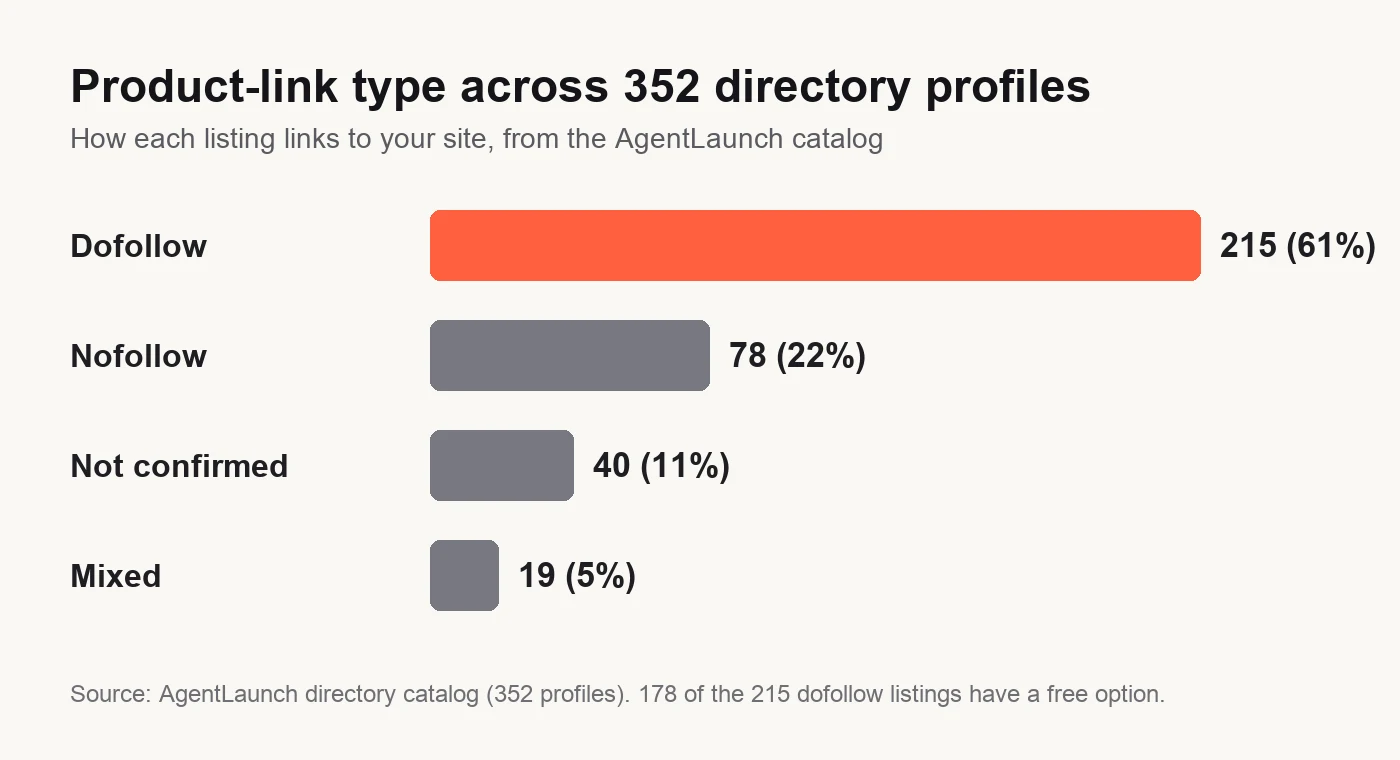
- Pick by fit and link type. In the AgentLaunch catalog, 215 of 352 directory profiles give a dofollow product link, and 178 of those have a free option. The dofollow directories list filters them.
- Submit your custom domain, not
lovable.app. BetaList refuses free hosting subdomains, per its help pages. - Check quality first. Skip sites with no real traffic. Here's how to check directory backlink quality.
Directories are a base layer, not a traffic plan. ShieldLabs made 160 submissions and got 89 live listings, which sent 171 of about 3,300 sessions.
Add communities, launches and content on top. Our guide to marketing a vibe-coded app has the full plan.
For next steps, see where to submit a vibe-coded app and how to get backlinks for a new website.
If you'd rather not fill in forms yourself, AgentLaunch is an AI agent you run from Claude Code, Codex or Cursor. It submits your product to hand-checked directories in a real browser and stops only for CAPTCHAs, payments or 2FA.
Either way, check which directories fit your app before you submit anywhere.
Common mistakes
- Trusting a third-party scanner on an older project. It may see an empty page. URL Inspection shows what Google sees.
- Paying for an external prerendering service. Lovable says hosted projects don't need one on either stack.
- Leaving
lovable.appURLs in canonicals or the sitemap. With 302 redirects, those signals decide which address Google keeps. - Forgetting to publish. Fixes, metadata and sitemap changes reach Google only after you publish.
- Changing the custom domain without re-verifying it in Search Console.
- Stopping at a clean review. It doesn't judge content quality, search intent or backlinks.
What results to expect from SEO for Lovable apps
- Indexing: Lovable says new pages can take days, and sometimes longer, depending on Google's crawl schedule and your site's authority.
- Search Console data: Google says data appears in a new property within a few days. Lovable notes it usually lags by a couple of days.
- Rankings: Lovable states that passing technical checks doesn't guarantee high rankings. Content, intent, competition and backlinks decide.
- Directories: the ShieldLabs numbers above are a fair guide. Expect links and a trickle of visits, not a flood.
Nobody publishes a reliable benchmark for how fast a new Lovable app ranks. Be wary of anyone who promises a timeline.
FAQ
Is Lovable SEO friendly?
Yes. Published Lovable apps return readable HTML to search engines and AI crawlers, server-rendered on new projects and prerendered on older ones. Rankings still depend on content, links and competition.
Does Lovable do SEO for you?
It handles the technical base: rendering, robots.txt, a review that fixes metadata and sitemap issues, and Search Console setup. It doesn't write your content or earn backlinks.
How do I fix Lovable SEO issues on an older project?
Run the SEO & AI search review, fix what fails, connect a custom domain and submit the sitemap. Upgrade to TanStack Start if you need per-page metadata or reliable link previews.
Do I need Prerender.io or another prerendering service for Lovable?
No. Lovable's docs say hosted projects need no external prerendering service for search engines or AI crawlers.
What is a good Lovable SEO prompt?
Specific ones, like Which keywords should I target next? or Update the meta description of the pricing page. A vague "make my site SEO friendly" gets vague changes.
Is the Lovable SEO advice on Reddit still right?
Check the date. Advice from before 13 May 2026 describes the old client-side setup. Anything claiming Lovable apps can't be indexed is out of date.