Vibe coding growth guidesSEO and backlinks
Bolt.new SEO: How to Get Your Bolt App Indexed by Google (Step-by-Step Guide)
What Bolt.new generates, what Pro's SEO boosting does, and how to add the meta tags, sitemap, robots.txt, prerendering and Search Console setup Bolt's docs skip.
 By Pruthvi RajNovember 23, 2026
Bolt.new SEO comes down to one problem: Bolt builds a client-rendered React app by default, so crawlers see a mostly empty page until JavaScript runs.
Quick answer:
- Check your raw HTML with curl to see what Google gets.
- On Pro, connect a custom domain and turn on SEO boosting if your settings show it.
- Prompt Bolt for per-route titles, descriptions, Open Graph tags, a sitemap and robots.txt.
- No Pro? Publish to Netlify and use its Prerender extension, or switch to a framework that outputs HTML.
- Submit the sitemap in Search Console, then earn links from directories that fit.
Bolt's fix is SEO boosting, a Pro feature that needs a custom domain. Sitemaps, robots.txt and Search Console are up to you.
Is Bolt.new good for SEO? What it generates and where it hosts
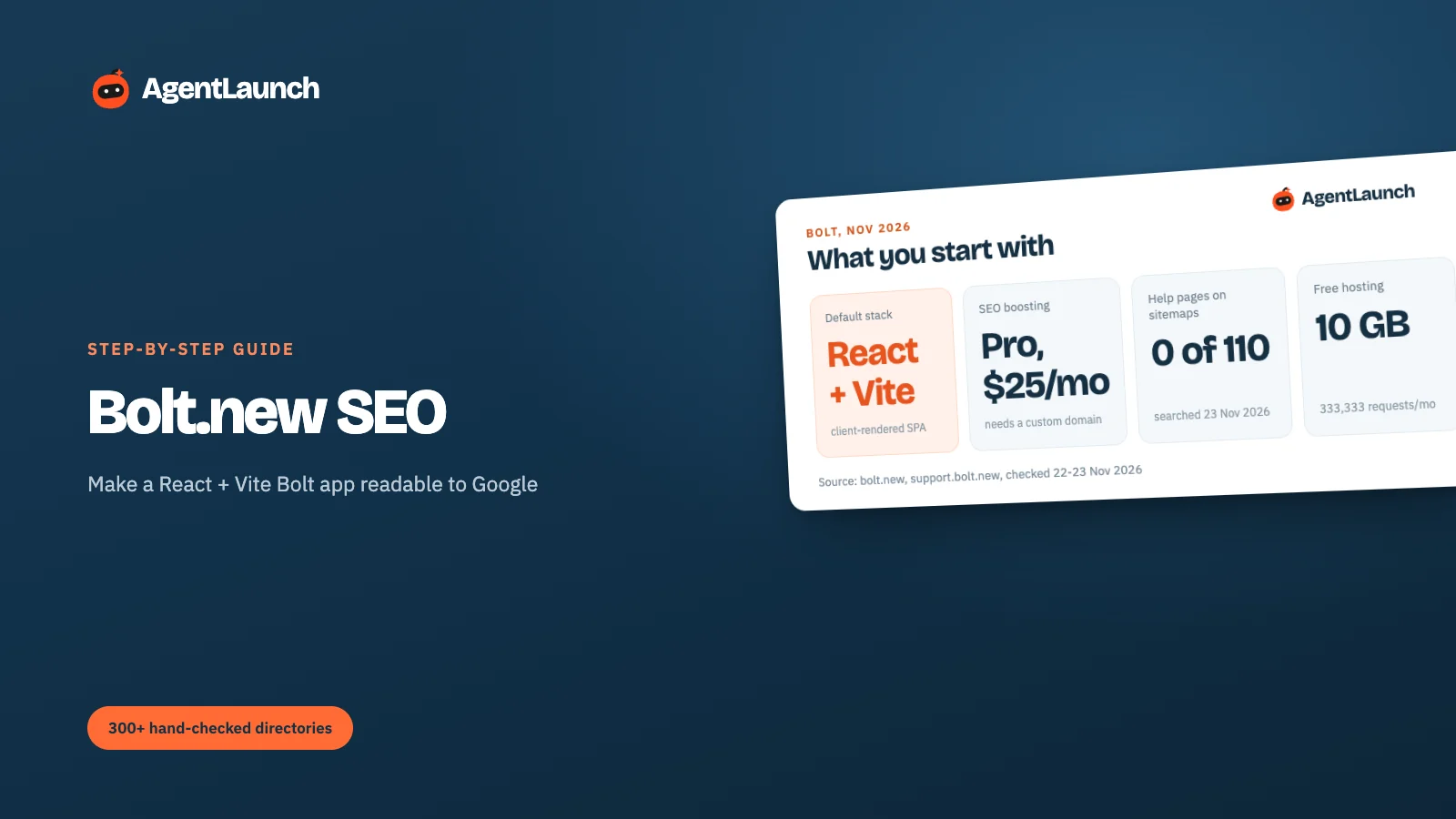
Bolt says it builds with React, Vite, Tailwind CSS and Node.js by default. It publishes to its own hosting, with a free .bolt.host address.
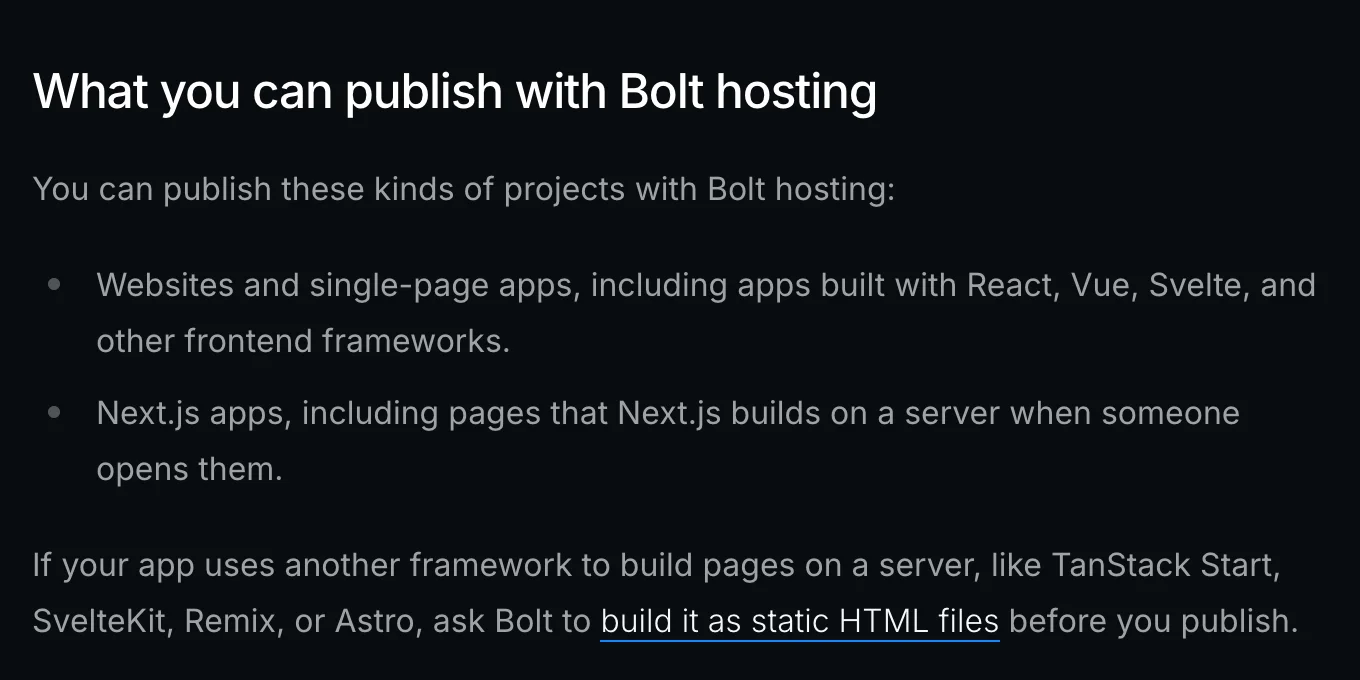
Per the Bolt hosting docs, Bolt hosting can publish:
- Single-page apps built with React, Vue, Svelte and similar frameworks.
- Next.js apps, including pages Next.js builds on the server.
- TanStack Start, SvelteKit, Remix and Astro, but only once built as static HTML.
Google can run JavaScript, but pages wait in a render queue first. Google's JavaScript SEO guide still recommends pre-rendering, because not all bots can run JavaScript.
What Bolt's docs leave out
We searched all 110 pages of Bolt's help center on 23 November 2026. None mention sitemaps, robots.txt, Search Console, structured data, meta descriptions or Open Graph.
A September 2026 audit by J.A. Watte found the same gap. What Bolt does offer is an SEO/GEO skill you can turn on per project, and an SEO category in its Prompt Library.
What you'll need
| What | Time | Cost |
|---|---|---|
| Bolt Pro | 5 min | $25/month |
| A domain you own | 15 min plus DNS wait | Registrar fee |
| Netlify account, if you skip Pro | 20 min | Free plan works |
| Google Search Console | 15 min | Free |
| A terminal with curl | 2 min | Free |
| A shortlist of directories | 2–6 hours | Mostly free |
The free plan has a limit that hurts SEO. Free hosting covers 10 GB of bandwidth and 333,333 requests a month per account. Hit it and your sites stop serving until the next cycle, and an offline site can't be crawled.
Step 1: Check what Google gets from your Bolt app
Run this against your home page and one inner page:
curl -s https://yoursite.bolt.host/ | grep -iE "<title>|<h1|<meta name=\"description\""
curl -s https://yoursite.bolt.host/pricing | grep -iE "<title>|<h1"
- Each route has its own title and H1: your content is already in the HTML. Skip Steps 3 and 6.
- Same title everywhere, no H1, an empty
<div id="root">: you have a client-rendered app. Steps 3 and 6 fix it. - Inner pages return Page not found: you need a redirect rule. Prompt Bolt to add a
_redirectsfile with/* /index.html 200, then click Publish, then Update.
Step 2: Connect a Bolt.new custom domain
Bolt's docs say custom domains are only on paid plans. You need one anyway.
SEO boosting requires it, and links you earn should point at an address you'll keep. Some launch sites, like BetaList, also refuse free hosting subdomains.
- Publish the project first. The domain option only appears on a published site.
- Click your project name, then All project settings, then Domains & Hosting.
- Click Connect a domain you own, enter it, then Verify and add domain. You can also buy one here.
- At your registrar, add the DNS records Bolt shows.
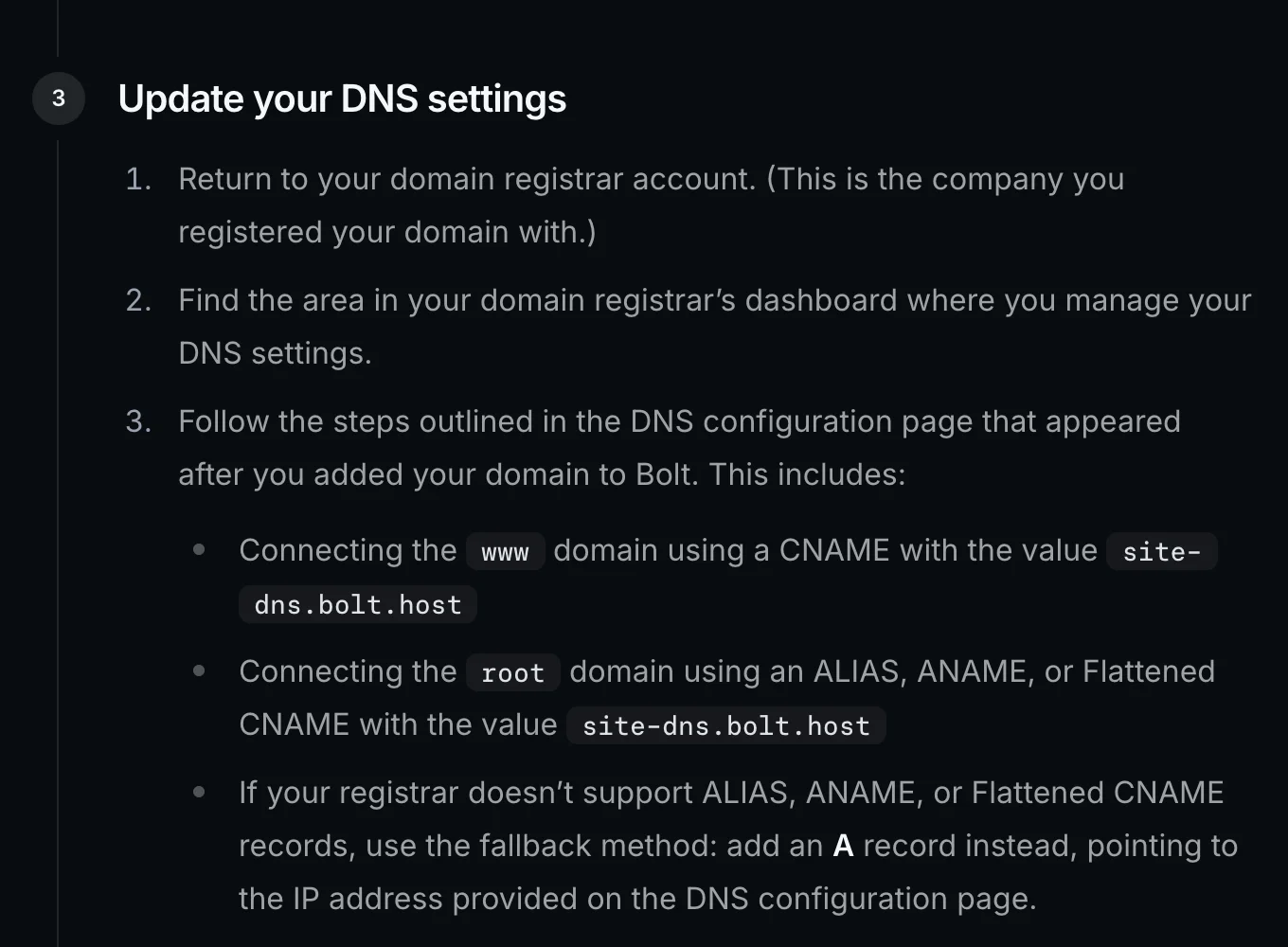
The records:
- www: a CNAME to
site-dns.bolt.host. - Root domain: an ALIAS, ANAME or flattened CNAME to the same value. If your registrar can't do that, use the A record Bolt shows.
- Subdomains like
app.example.comalso need a TXT record.
Pick one primary domain
Extra domains added as aliases forward to your primary domain. Bolt says this helps SEO and avoids duplicate content.
Also ask Bolt for a canonical tag on every page pointing to your custom domain. That stops old .bolt.host URLs from competing with it.
Step 3: Turn on Bolt SEO boosting (prerendering)
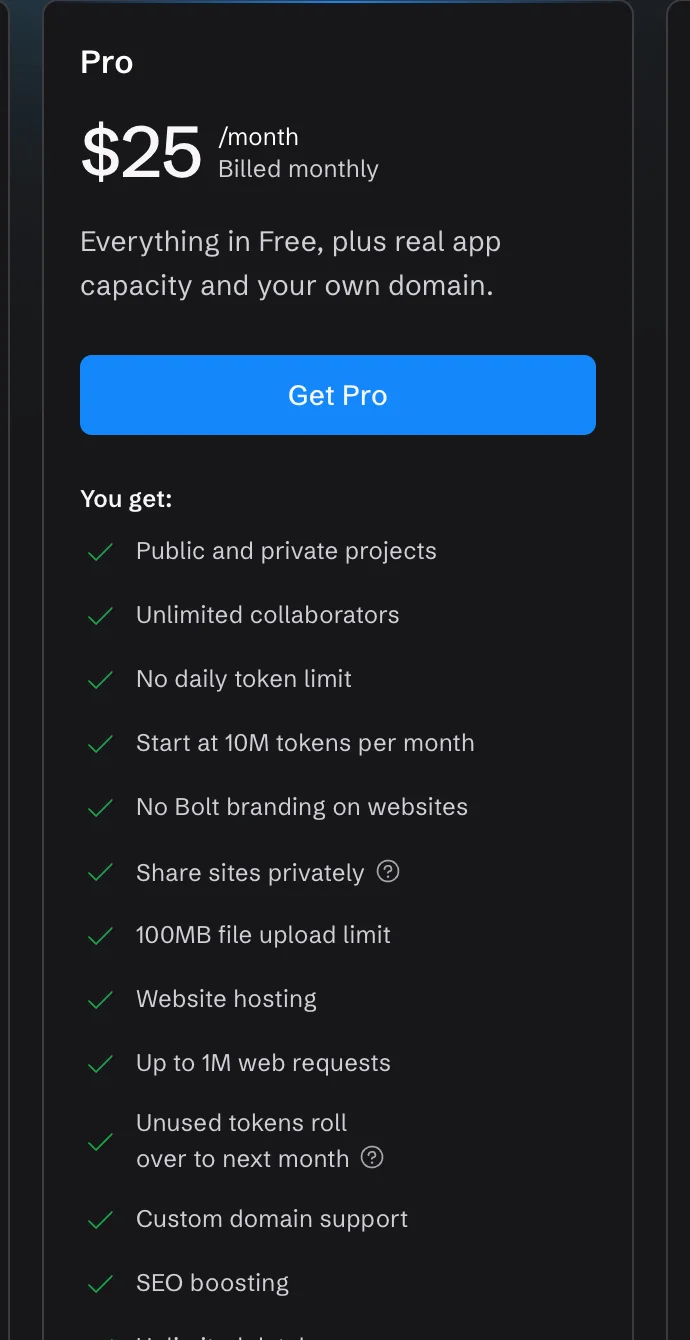
Bolt's v2 launch post explains it: SEO boosting builds a ready HTML version of each page ahead of time, so search engines get the full page at once. The pricing page lists it under Pro, not Free.
How to turn it on, per Bolt's help page as it read through June 2026:
- Connect a custom domain. Without one, the option doesn't appear.
- Click the gear icon or your project name, then All project settings.
- Click Domains & Hosting.
- Under Hosting settings, click Enable SEO Boost. It's off by default.
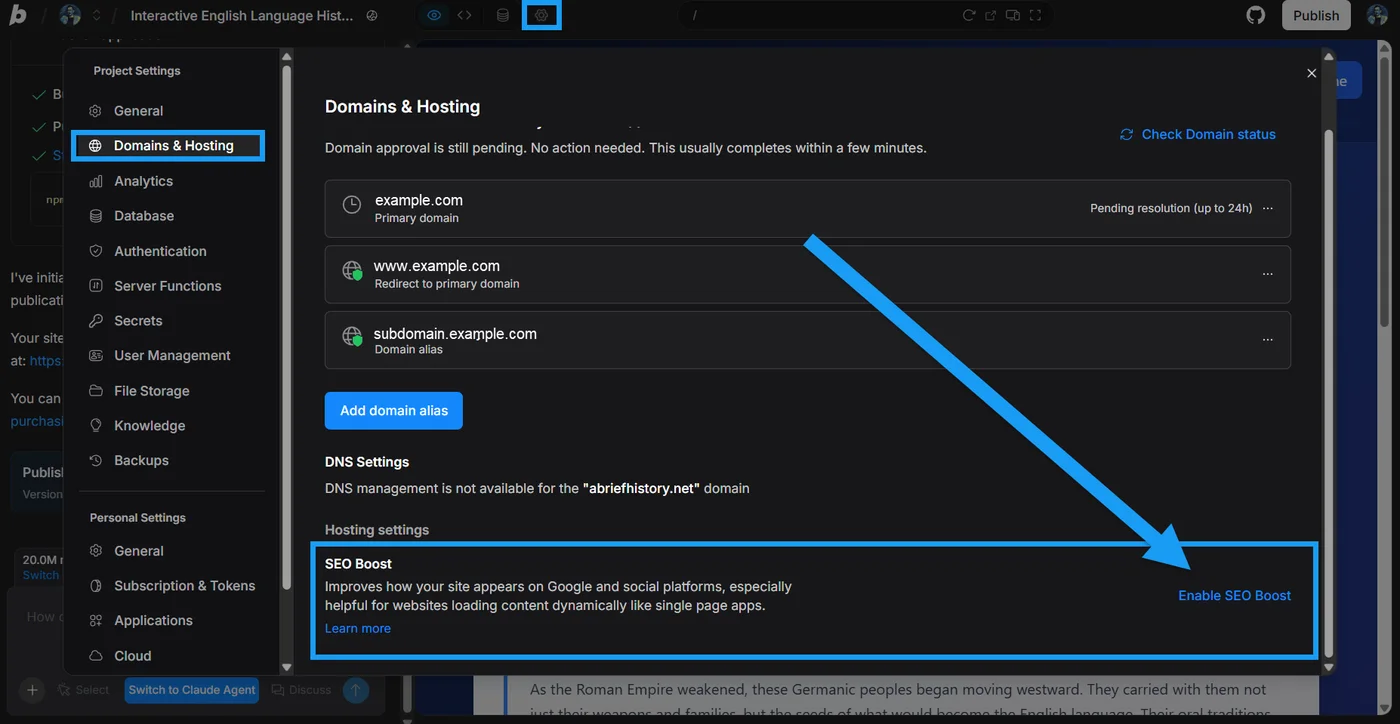
One caveat. That help page has redirected to the general hosting page since at least 20 September 2026. No current help page describes SEO boosting, though the pricing page still sells it.
So on Pro, look for the toggle, then confirm it works with a crawler user agent:
curl -s -A "Googlebot" https://yourdomain.com/pricing | grep -iE "<title>|<h1"
If the H1 still isn't there, crawlers aren't getting a prerendered page. Go to Step 6.
Step 4: Add meta tags and Open Graph with one prompt
Every route needs its own title and description in the HTML Google receives. Turn on the SEO/GEO skill in your project's Skills settings, then send:
Give every public route its own <title> (under 60 characters), meta
description (140-160 characters), canonical URL on https://yourdomain.com,
Open Graph and Twitter card tags, and one H1. Use react-helmet-async or the
framework's metadata API, and make sure the tags are present in the
prerendered or server-rendered HTML, not only after JavaScript runs.
Add Organization and SoftwareApplication JSON-LD to the home page.
Then check two routes with curl. Tags added only by JavaScript won't help a crawler that doesn't run it. That's why Steps 3 and 6 matter.
Step 5: Generate a Bolt.new sitemap and robots.txt
Bolt doesn't create these for you. Prompt:
Create public/sitemap.xml listing every public route on https://yourdomain.com
with absolute URLs and lastmod dates, and regenerate it at build time when
routes change. Create public/robots.txt that allows all crawlers, blocks
/dashboard and other logged-in routes, and ends with
Sitemap: https://yourdomain.com/sitemap.xml
Republish, then open /sitemap.xml and /robots.txt on your live domain. Every URL should use your custom domain, not .bolt.host.
Google allows 50,000 URLs or 50 MB per sitemap. That only matters if you generate pages at scale.
Step 6: Prerender through Netlify or switch frameworks
If SEO boosting isn't available, or curl shows it isn't working, you have two routes.
Option A: Bolt.new on Netlify with the Prerender extension
Bolt can publish to your own Netlify account instead of Bolt hosting:
- Connect Netlify: project name, All project settings, Applications, then Connect next to Netlify.
- While the project is still unpublished, open Domains & Hosting and pick Netlify under Hosting Provider. The dropdown doesn't appear on a published project.
- Click Publish, then Publish again.
The catch: Bolt says Netlify can't host a database or a traditional backend. If your app uses Bolt's database or server functions, stay on Bolt hosting.
Then turn on prerendering in Netlify. Per Netlify's prerendering docs, a team owner installs the Prerender extension, selects Enable prerendering and redeploys.
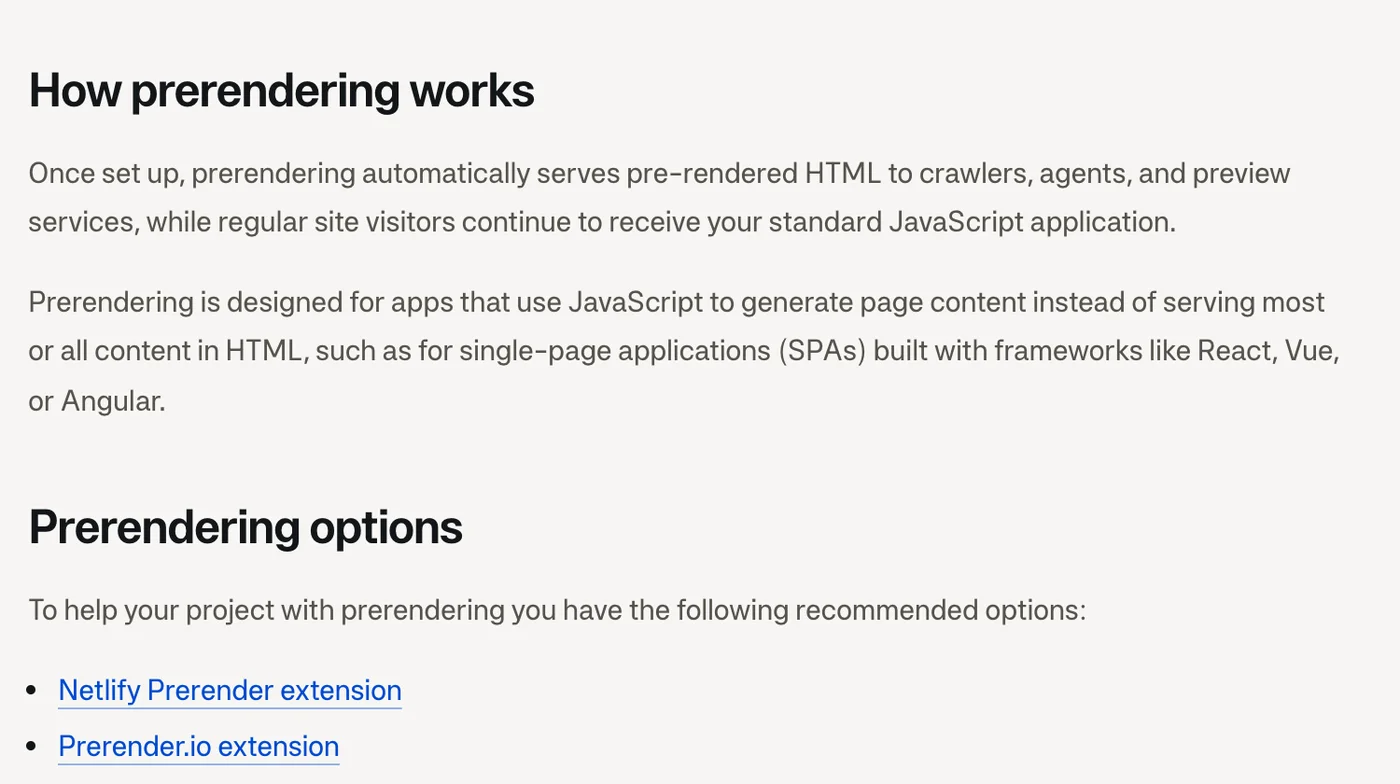
Crawlers get HTML from a headless browser, and people get the normal app. Netlify charges only for the functions it runs, and the extension needs Node.js 20 or later.
Netlify's Free plan includes your own domain. So for front-end-only apps, this path can work without Bolt Pro.
Option B: Output real HTML
Serving prerendered pages only to bots is what Google calls dynamic rendering. Google says it was a workaround and recommends server-side or static rendering instead. On Bolt that means:
- Prerender public pages at build time. Ask Bolt to build the home, pricing, feature and blog routes as static HTML while the app stays a single-page app. This is the least disruptive.
- Next.js. Bolt hosting runs server-rendered Next.js pages directly. Worth it if you plan a blog or many landing pages.
- Astro or another static-first framework, built as static HTML.
We'd start with build-time prerendering and move to Next.js only if content becomes your growth plan.
Step 7: Submit your Bolt site to Google Search Console
- Add a Domain property in Search Console. It covers www and non-www and verifies with a DNS TXT record. If you bought the domain in Bolt, add the TXT in Bolt's DNS settings.
- Under Sitemaps, submit
https://yourdomain.com/sitemap.xml. - Run URL Inspection on your home page, click Test live URL, then View tested page. Check that your real content is there.
- Click Request indexing for the home page and a few key pages.
Google says crawling can take a few days to a few weeks, and asking again doesn't speed it up. Our indexing glossary entry explains the statuses you'll see.
Step 8: Build authority with backlinks
Technical fixes get your pages read. Links get a new domain found and trusted, and Bolt has no feature for that.
Start with launch platforms and directories that give a followed link. In the AgentLaunch catalog, 215 of 352 directories do. All four below give a dofollow product link:
| Site | DR | Cost |
|---|---|---|
| Product Hunt | 91 | Free |
| AlternativeTo | 80 | Free |
| Uneed | 76 | Free, paid extras |
| MicroLaunch | 64 | Free |
Bolt has no official app gallery. Our guide to where to submit a vibe-coded app and the launch platforms list are the closest thing.
Keep expectations modest. One founder on Indie Hackers got 171 of about 3,300 sessions from 89 live listings.
For other free link sources, see how to get free backlinks. Check any site's strength with the free DR checker.
AgentLaunch is an AI agent you run from Claude Code, Codex or Cursor that submits to hand-checked directories for you. It writes copy for each one and stops only for CAPTCHAs, payments or 2FA. Before you submit anywhere, check which directories fit your app.
Common mistakes
- Paying for Pro and never enabling SEO Boost. It's off by default and only shows once a custom domain is connected.
- Trusting meta tags you can't see in curl. If they appear only after JavaScript runs, many crawlers miss them.
- A sitemap full of
.bolt.hostURLs after moving to a custom domain. - Free-plan sites hitting the bandwidth cap. They go offline until the cycle resets.
- Moving a database-backed app to Netlify. Netlify can't host Bolt's database or backend.
- Skipping the
_redirectsrule. Inner pages break when Google opens them directly. - Stopping after the technical fixes. SEO boosting fixes rendering, not authority.
What results to expect
There's no published data on how Bolt sites rank. Crawling after a request takes days to weeks.
Watch Search Console for impressions on your brand name first. That's the earliest sign your pages are indexed.
Competitive terms need content and links on top of these fixes. For other builders, see our Replit SEO guide and Lovable SEO guide, or the SEO checklist for vibe-coded apps.
FAQ
Is Bolt.new good for SEO?
Only partly out of the box, because the default app is client-rendered. With Pro, a custom domain, SEO boosting, meta tags and a sitemap, a Bolt site can be fully crawlable.
Does Bolt.new generate a sitemap?
No, and none of Bolt's 110 help pages mention sitemaps. Ask Bolt to create public/sitemap.xml and robots.txt, then submit the sitemap in Search Console.
What is Bolt SEO boosting and is it free?
It's Bolt's prerendering: a ready HTML copy of each page for search engines. It's listed under Pro at $25 a month, needs a custom domain and is off until you enable it.
Can I use a Bolt.new custom domain for free?
Not on Bolt hosting, where custom domains are paid only. Netlify's Free plan includes your own domain, so a front-end-only app can go there.
Is Bolt.new on Netlify better for SEO?
It can be on the free plan, since Netlify's Prerender extension serves crawlers rendered HTML. But Netlify can't host Bolt's database or backend.
Does Bolt.new support server-side rendering?
Yes, for Next.js. Other frameworks like SvelteKit, Remix or Astro must be built as static HTML before publishing.