Vibe coding growth guidesSEO and backlinks
Lovable Custom Domain: How to Add, Connect and Fix It (Step-by-Step Guide)
The exact steps to put a Lovable app on your own domain: plan needed, DNS records per registrar, Cloudflare, SSL timing, official error fixes and the SEO steps after.
 By Pruthvi RajNovember 23, 2026
A Lovable custom domain needs a paid plan, a published project, and either a domain bought in Lovable or two DNS records at your registrar.
Quick answer:
- Get a paid plan and publish your project.
- Open Project → Settings → Domains and buy, connect or transfer a domain.
- For a domain you own, add the
AandTXTrecords Lovable shows, or let Entri add them.- Wait for Active, then check that
lovable.appandwwwredirect to your domain.- Re-run the SEO review, verify the domain in Search Console and update your links.
A domain bought through Lovable usually goes live within 30 minutes. A connected domain can take up to 72 hours, though most are live in a few hours.
Setup is the easy half. Step 8 covers the SEO work after the switch.
What you'll need
| What | Time | Cost |
|---|---|---|
| Lovable paid plan | 2 min | Pro is listed at $25/month |
| Published project | 1 min | Publishing uses no credits |
| A domain | 5 min | Yearly price shown at checkout, or one you own |
| DNS access at your registrar | 10 min | Free |
| Editor role, or admin to buy | None | None |
| Google Search Console | 10 min | Free |
Step 1: Check your plan and publish the project
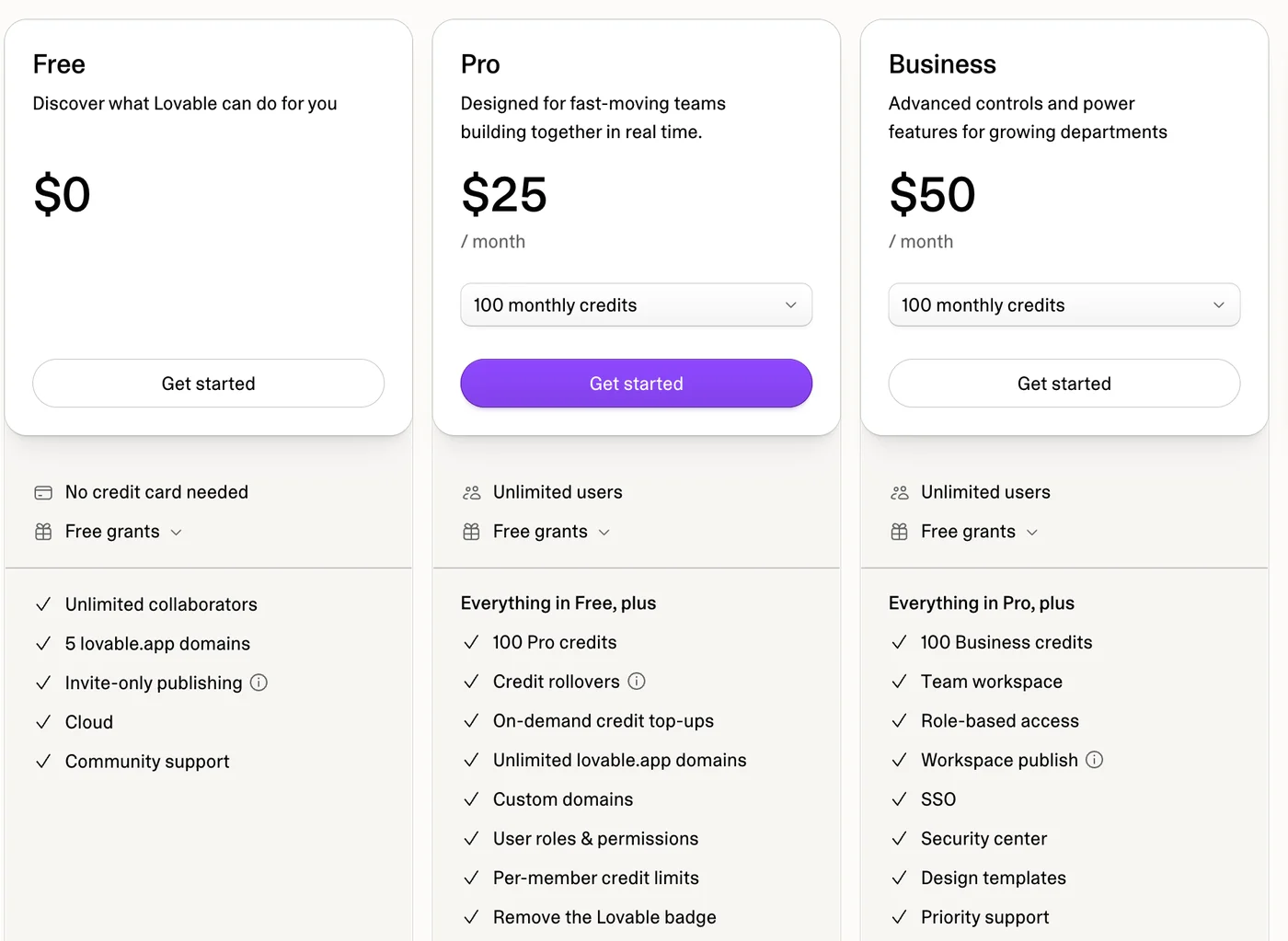
Lovable's docs are plain: "Custom domains are available on paid plans." On the Lovable pricing page, Free gets 5 lovable.app addresses and Pro lists custom domains.
Then click Publish in the top-right of the editor and confirm. Per Lovable's launch guide, visitors see nothing on your domain until the project is published.
Before you pay:
- Free domain for a year. Since 20 November 2026, upgrading from Free on the web lets you claim one domain free for the first year. Claim it within 90 days. It covers
.app,.dev,.coand a few more, but not.com, and not plans bought in the iOS app. - Downgrading later. Connected domains keep working if you drop back to Free. You just can't connect new ones.
Step 2: Choose how to add a custom domain in Lovable
Open Project → Settings → Domains, or click Add domain in the Publish dialog. You get three paths.
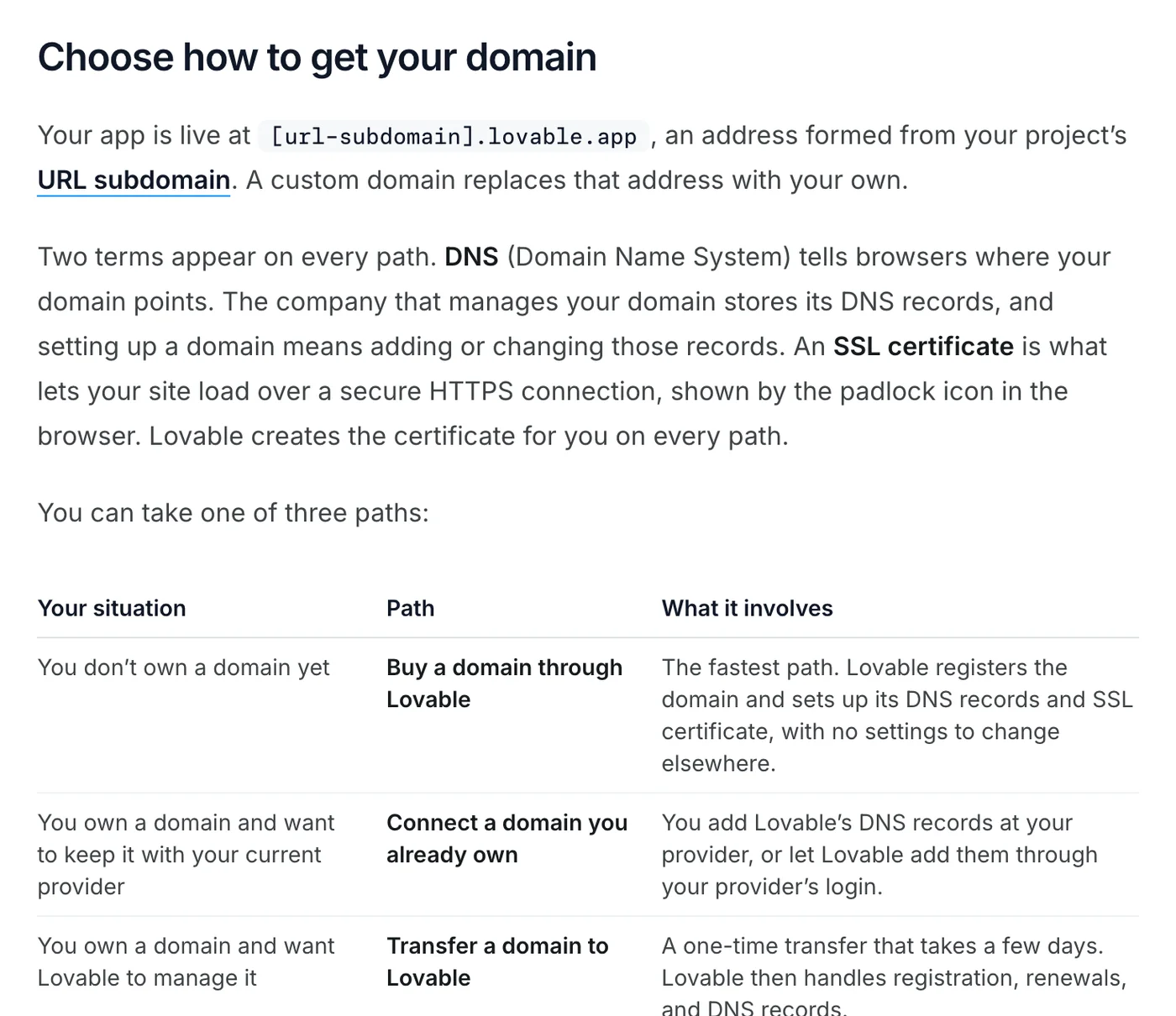
Buy a domain through Lovable
Search under Find and buy a domain, pick a term, keep Auto-renew on and click Confirm purchase. Lovable registers the domain, sets the records, issues SSL and connects both the bare domain and www.
Two catches from the buy docs:
- Premium domains can't be bought in Lovable.
- If your registrant email differs from your Lovable login, click the ICANN verification link within 15 days. Otherwise the registrar can suspend the domain.
We'd pick this path if you don't own a domain yet. There's no DNS to get wrong.
Connect a custom domain you already own to Lovable
Click Connect under Connect a domain you own and enter yourdomain.com or app.yourdomain.com. Choose Root domain or Subdomain.
For a root domain, leave the Redirect www switch on. The DNS window opens next. Don't close it early, or Lovable cancels the new connection.
Transfer a domain to Lovable
Go to Workspace settings → Workspace domains → Transfer in. You'll need:
- A root domain not registered or transferred in the last 60 days.
- The transfer lock off and DNSSEC disabled, then a wait of up to 24 hours.
- The EPP authorization code.
Transfers take 5 to 7 days, and your site keeps working meanwhile. Connect the domain to your project afterwards.
Step 3: Add the Lovable custom domain DNS records
Automatic setup with Entri
The setup window detects your DNS provider through Entri and asks you to log in. Authorize it and the records are added for you.
If Entri picks the wrong provider, choose Connect a different way, then Change provider.
Manual records
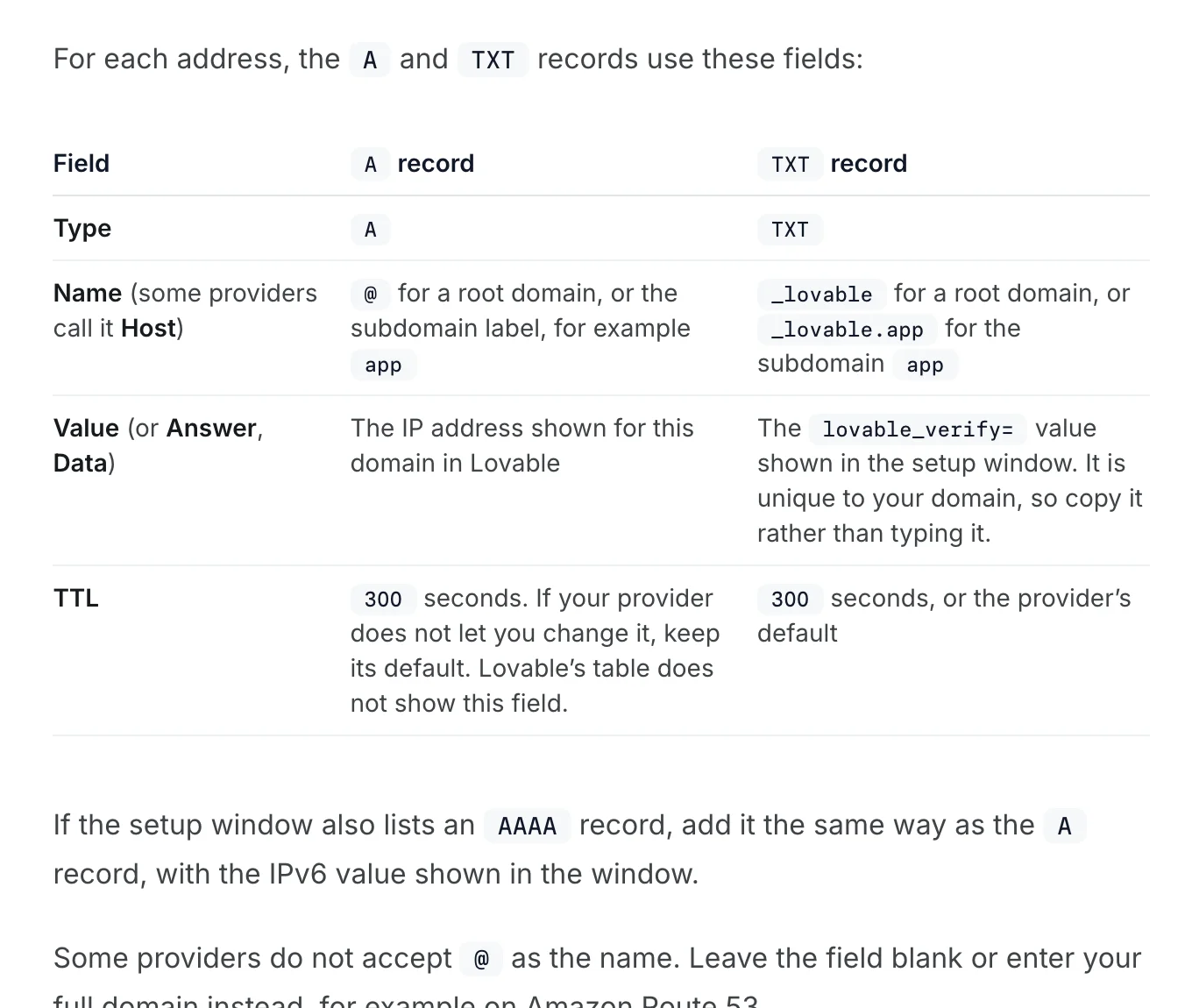
Choose Connect a different way → Set up manually and copy every record shown.
| Type | Name / Host | Value |
|---|---|---|
A |
@ |
IP shown in Lovable |
TXT |
_lovable |
Your unique lovable_verify= value |
A |
www |
IP shown for www |
TXT |
_lovable.www |
Its own lovable_verify= value |
A subdomain like app gets the same pair at app and _lovable.app. Set TTL to 300 if you can. If Lovable lists an AAAA record too, add it.
Namecheap, GoDaddy and other registrars
The records are the same everywhere. Only the labels change: the name field may say Name or Host, and the value field Value, Answer or Data.
Some providers reject @. Lovable says to leave the name blank or type the full domain instead. You never need an SSL certificate from your registrar, because Lovable issues its own.
Not sure where your DNS lives? Look up your NS records on dnschecker.org. That's where the records go, not always where you bought the domain.
Cloudflare: DNS only, or proxy mode
For a standard connection, set the Lovable records to DNS only, the gray cloud. Lovable ties Cloudflare errors 1001 and 1003 to the orange-cloud proxy.
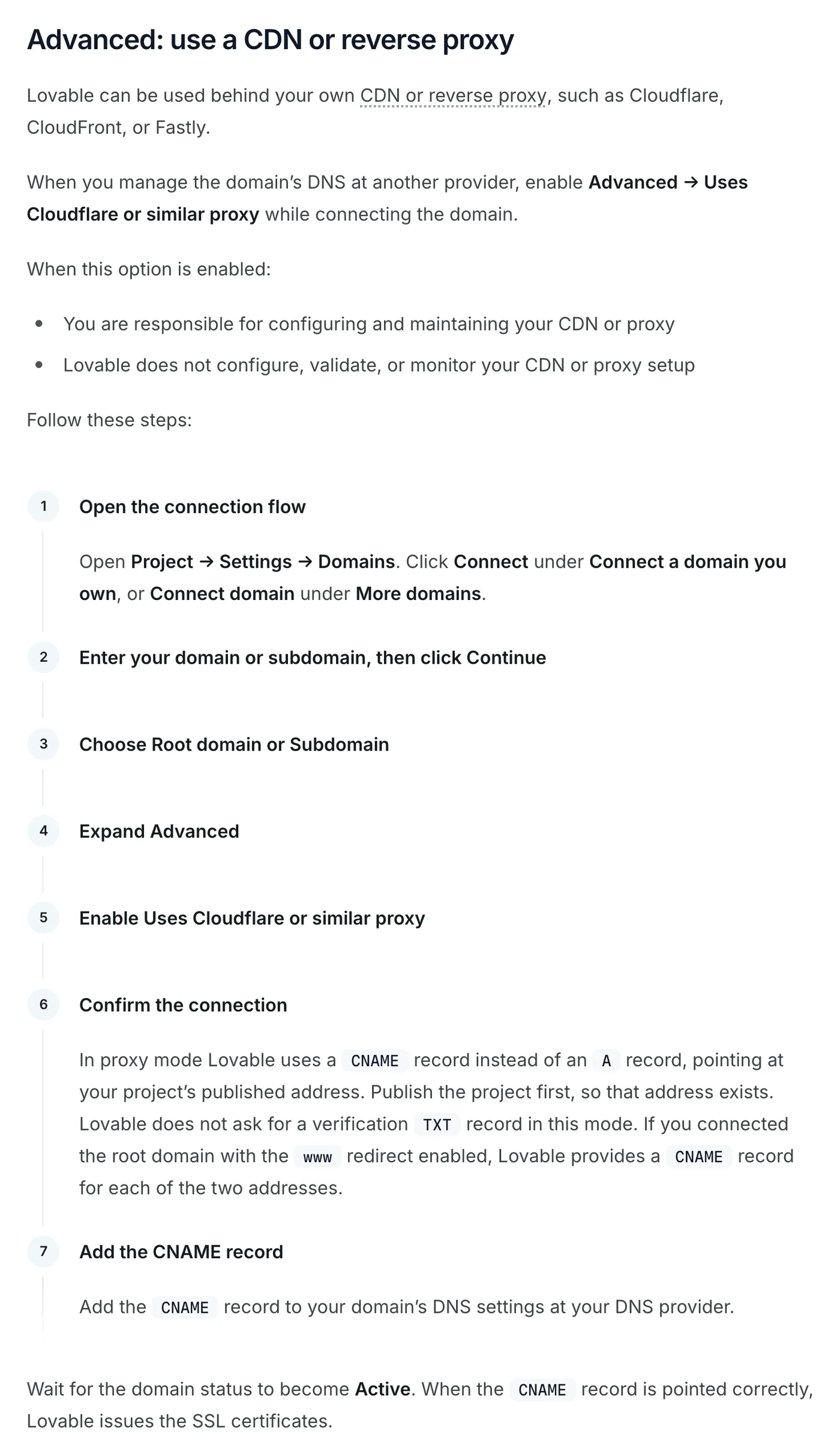
Want Cloudflare's proxy in front? Connect with Advanced → Uses Cloudflare or similar proxy turned on. Lovable then asks for one CNAME to your published address instead of A and TXT records, so publish first.
The trade-off: in proxy mode, Lovable doesn't configure, check or monitor your proxy setup.
Clean out old records
At the name you're connecting, delete any A, AAAA or CNAME record Lovable didn't give you. Leftovers from an old host are what make a domain show your previous site.
Keep MX records for email. Any CAA records must allow one of these issuers:
0 issue "pki.goog"0 issue "letsencrypt.org"0 issue "ssl.com"
Step 4: Wait for Active
Click Done and watch the progress line under the domain. It moves from Preparing through finding your records to Finishing up, where SSL is issued.
Active means done. www included means www works too.
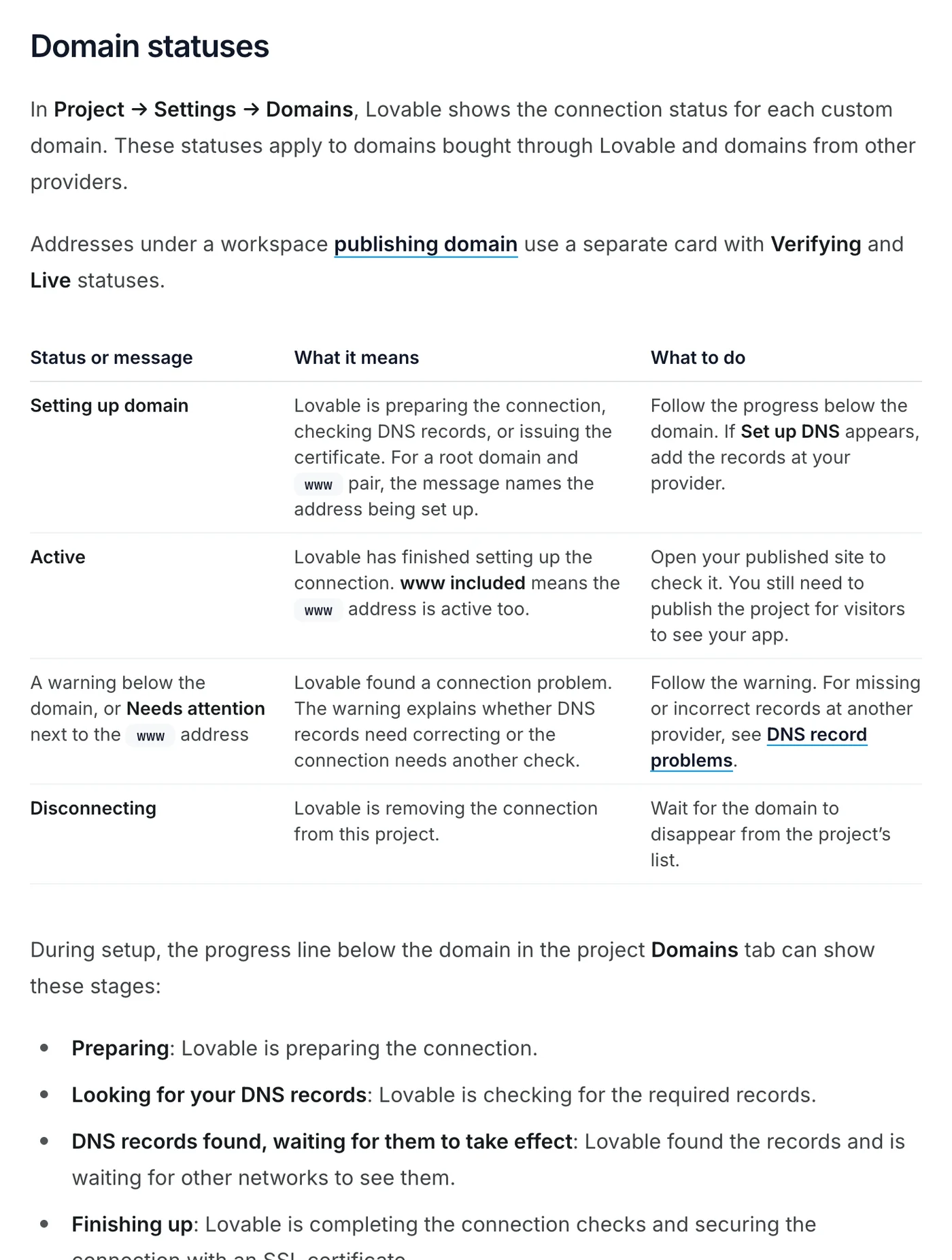
Bought domains usually go live within 30 minutes. Connected ones take up to 72 hours, and SSL is automatic. Contact support if it's missing after 72 hours.
To force a recheck, open the domain's three-dots menu and select Check again.
Step 5: Set the primary domain and the www redirect
The first custom domain you connect becomes primary automatically. Every other address, including lovable.app and www, then redirects to it. Use Set as primary in the three-dots menu to change it.
Lovable's default is the bare domain as primary, with www redirecting to it. If you turned the Redirect www switch off, connect www.yourdomain.com separately.
One detail matters for SEO. Redirects between connected domains are a 302, which is temporary, and Lovable doesn't support 301s there. You can't remove the lovable.app URL either.
Step 6: Test the live site
In a private window, check:
https://yourdomain.comloads your app with the padlock.- Your
lovable.appaddress andwwwboth redirect to the primary domain. - Sign-in and forms work on the new domain.
If sign-in breaks, add the domain to your auth redirect URLs. Lovable's built-in backend does this for you; your own Supabase or Google OAuth setup doesn't.
Step 7: Fix a Lovable custom domain that's not working
Start with the message under the domain in Project → Settings → Domains. Here are the official states and fixes from the connect docs.
- Stuck on "Looking for your DNS records": a record is missing or wrong, often a cut-off
TXTvalue. Compare each with Setup instructions, then Check again. Query_lovable.yourdomain.comon dnschecker.org to see what the world sees. - "Some DNS records are missing or wrong": click Try to fix if offered. Otherwise re-copy the records, including any
AAAA. - Stuck on "Finishing up" or SSL fails: almost always
CAArecords. Add the three issuers from Step 3, or removeCAA. A subdomain inherits it from its parent. - Active, but it shows your old site: an old
AorAAAArecord still points at your previous host. Remove every record at that name Lovable didn't provide. - Cloudflare error 1001 or 1003: switch to DNS only, or reconnect in proxy mode with a
CNAME.
Still stuck? Ask Lovable in the project chat. It reports the domain's state, the records it expects and whether the project is published.
Step 8: Do the SEO steps people skip
Your app now answers on two addresses, and the redirect between them is temporary. Google's redirect docs say a temporary redirect isn't a signal that the target should be canonical.
So the 302 alone won't move indexing to your domain. Other signals have to do it.
Re-run the SEO review and check canonicals
Open More → SEO & AI search and click Scan again. Lovable says to rerun it whenever the primary domain changes.
Look for any canonical still pointing at lovable.app. Every page's canonical should use your custom domain.
Verify in Search Console and resubmit the sitemap
In the review, find Google Search Console isn't fully set up and click Try to fix. Lovable verifies the site with a meta tag and submits the sitemap.
Then open sitemap.xml and confirm every URL uses the new domain. Our Lovable sitemap and Search Console guide covers the indexing reports.
Skip Google's Change of Address tool. It checks for 301 redirects on the old site, and Lovable's redirect is a 302.
Update every link you control
Each link to lovable.app is a vote for the old address. Change your bios, GitHub README, Product Hunt page and any directory listings.
We wrote up how to update product details across directories without losing the listings.
Then go after links and directory listings
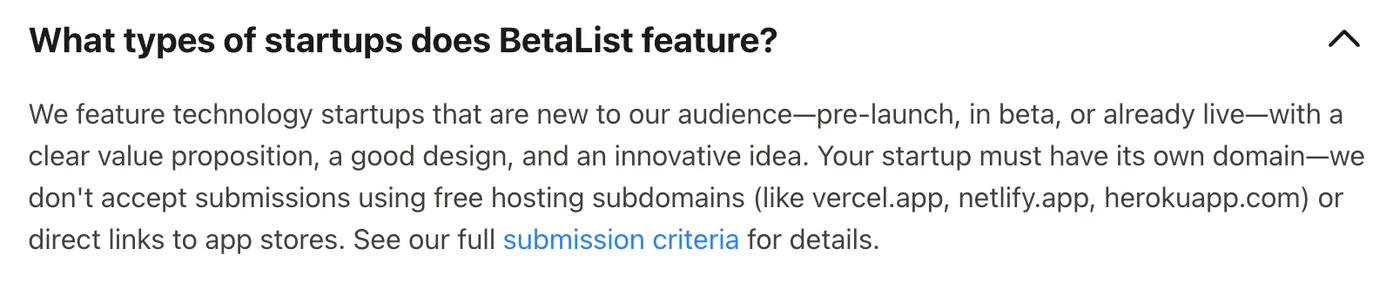
A new domain starts with no authority, but it opens doors a lovable.app URL can't. BetaList, DR 76 in the AgentLaunch catalog, says in its FAQ that your startup must have its own domain.
Before you submit anywhere, check which directories fit your app. Run the domain through the free DR checker for a baseline.
If you'd rather not fill forms by hand, AgentLaunch runs from Claude Code, Codex or Cursor. It submits your product to 300+ hand-checked directories in a real browser, stopping only for CAPTCHAs, payments and 2FA.
See where to submit a vibe-coded app for the full list, and how to get backlinks for a new website and the Lovable SEO guide for the wider plan.
Common mistakes
- Leaving the Cloudflare proxy on for a standard connection.
- Keeping old
A,AAAAorCNAMErecords. Visitors split between hosts. - Forgetting
www. Each address needs its own records. - Expecting the redirect to fix indexing. It's a 302. Fix canonicals, the sitemap and your links.
- Skipping Search Console after the domain change.
What results to expect
Setup usually takes a few hours, up to 72. Search is slower: Google may show old URLs for a while, and Lovable says visibility can keep improving over weeks or months.
If you're still at zero users, our guide on how to market a vibe-coded app picks up from here.
FAQ
Can I use a Lovable custom domain on the free plan?
No. Custom domains need a paid plan; Free gets 5 lovable.app addresses. If you downgrade later, connected domains keep working.
How much does a Lovable custom domain cost?
Connecting a domain you own costs nothing beyond the paid plan. Buying one in Lovable costs the yearly price shown at checkout. Upgrading from Free on the web gets you one non-.com domain free for a year.
Why is my Lovable custom domain not working?
Usually it's DNS still propagating, leftover records from an old host, the Cloudflare proxy, or CAA records blocking SSL. The message under the domain tells you which.
How long does Lovable take to set up SSL?
It's issued automatically during Finishing up. Contact Lovable support if it's missing after 72 hours.
Can I remove the lovable.app URL after adding a custom domain?
No. It stays, but once your domain is primary it redirects there with a 302.
Does a custom domain help Lovable SEO?
Yes. Lovable says it gathers backlinks, canonicals and search visibility under a domain you control. It also lets you list on directories like BetaList that reject free subdomains.