Vibe coding growth guidesSEO and backlinks
Claude Code SEO: A Step-by-Step Guide to Skills, Audits and MCP Servers
How to do SEO with Claude Code: the best SEO skills on GitHub, audit prompts, metadata, sitemap and internal link fixes, Search Console and GA4 over MCP, and links.
 By Pruthvi RajNovember 23, 2026
Claude Code SEO works in three layers. An SEO skill knows what to check, MCP servers bring your Google data, and Claude fixes your repo.
Quick answer:
- Install one SEO skill:
claude-seofor full audits, or the SEO skills in marketingskills.- Audit the pages crawlers see, then let Claude fix titles, schema, sitemap and links in code.
- Connect Search Console and GA4 over MCP so fixes follow real queries.
- Check Core Web Vitals with Chrome DevTools MCP.
- Then do the off-page work: listings and links the skills only analyze.
This is the SEO-only version of our Claude Code for marketing guide.
What you'll need
| What | Time | Cost |
|---|---|---|
| Claude Code 1.0.33 or newer | Already installed | Your Claude plan |
| Your site's repo, synced to GitHub | 5 min | Free |
Node.js with npx |
5 min | Free |
uv and pipx for the MCP servers |
10 min | Free |
| Google Cloud project with Search Console and Analytics APIs on | 20–30 min | Free |
| Chrome, current stable | Installed | Free |
| Optional: DataForSEO or Ahrefs | 10 min | Vendor pricing |
Step 1: Install the best Claude Code SEO skill for your site
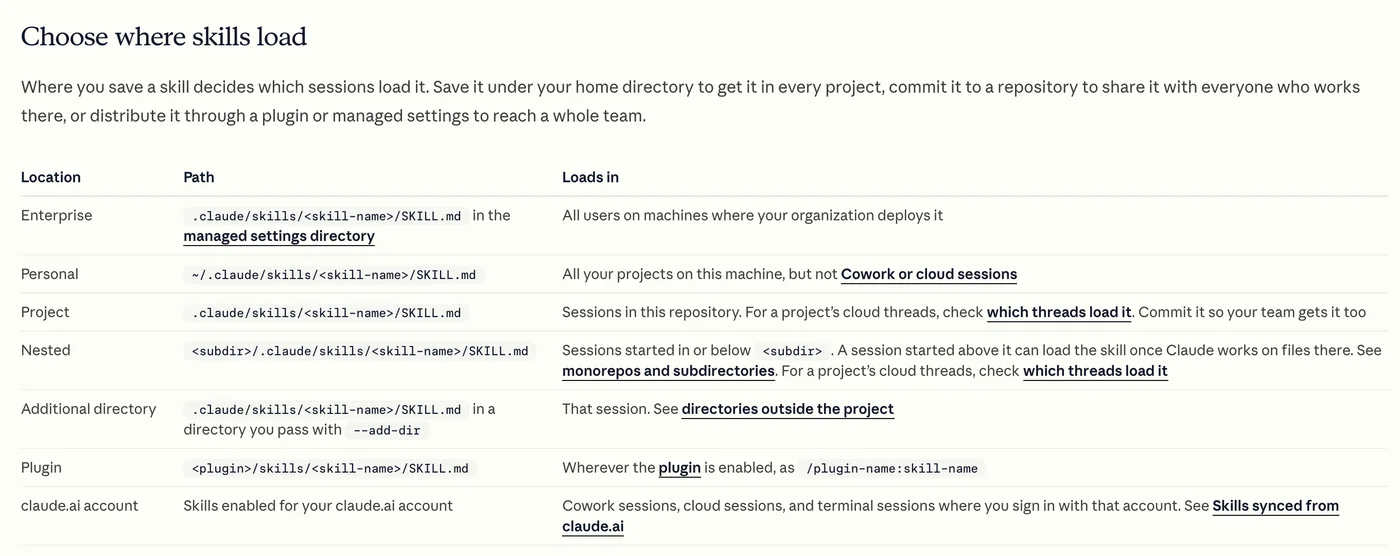
A skill is a folder with a SKILL.md file. Personal skills in ~/.claude/skills/ load in every project. Project skills in .claude/skills/ load for everyone in that repo.
For SEO, pick a project install so the skill travels with the site. Anthropic's Claude Code skills docs list every location.
Option A: claude-seo, the full audit plugin
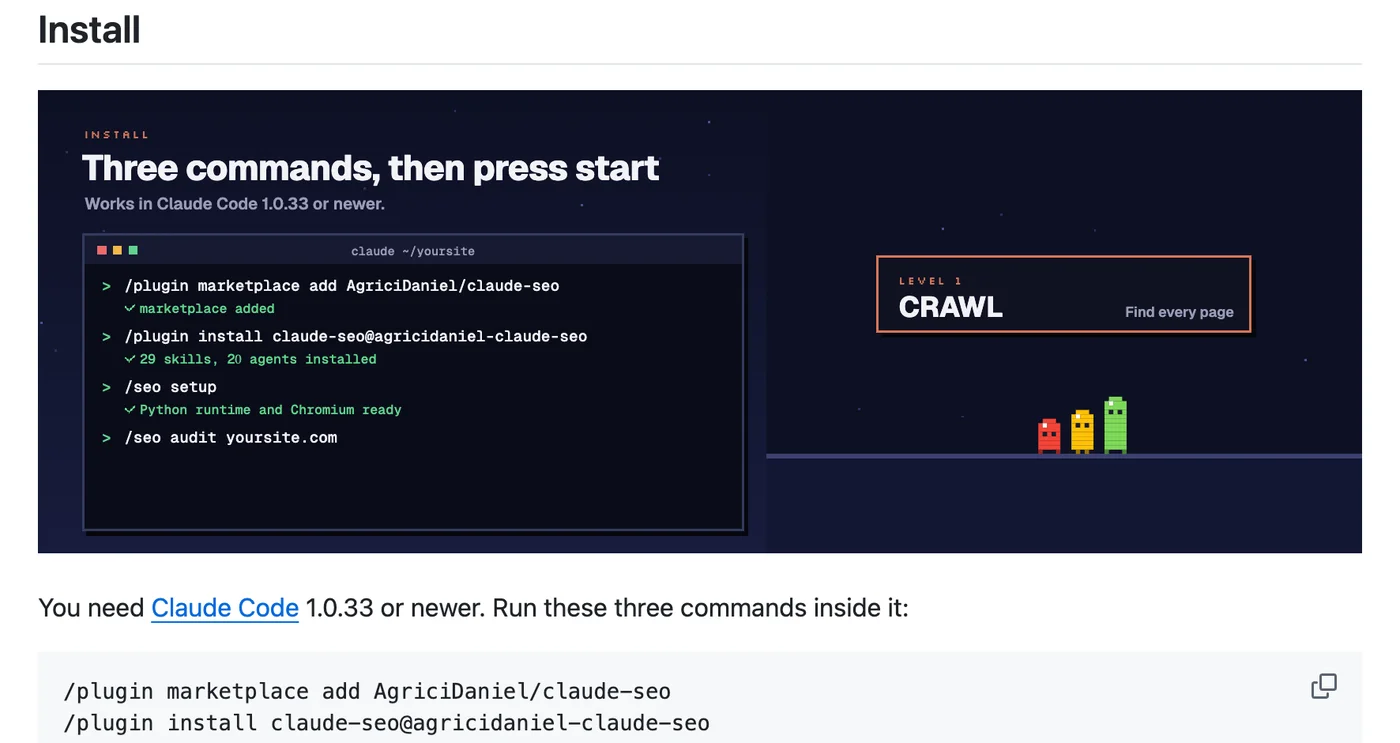
AgriciDaniel/claude-seo is MIT-licensed. Its README describes 29 sub-skills and 20 specialist agents, and says a full audit takes 10 to 15 minutes.
/plugin marketplace add AgriciDaniel/claude-seo
/plugin install claude-seo@agricidaniel-claude-seo
/seo setup
/seo setup installs a Python environment and a headless browser. Then /seo audit https://yoursite.com runs the audit.
Single jobs have their own commands: /seo technical, /seo schema, /seo sitemap, /seo programmatic, /seo geo, /seo google and /seo backlinks.
Option B: the SEO skills in marketingskills
coreyhaines31/marketingskills has five skills that matter for SEO:
seo-audit: technical SEO, indexing, titles, Core Web Vitals, traffic drops.schema: adding, fixing and validating JSON-LD.programmatic-seo: template pages at scale, each useful rather than thin.site-architecture: hierarchy, URL structure and internal links.ai-seo: getting cited in ChatGPT, Perplexity and AI Overviews.
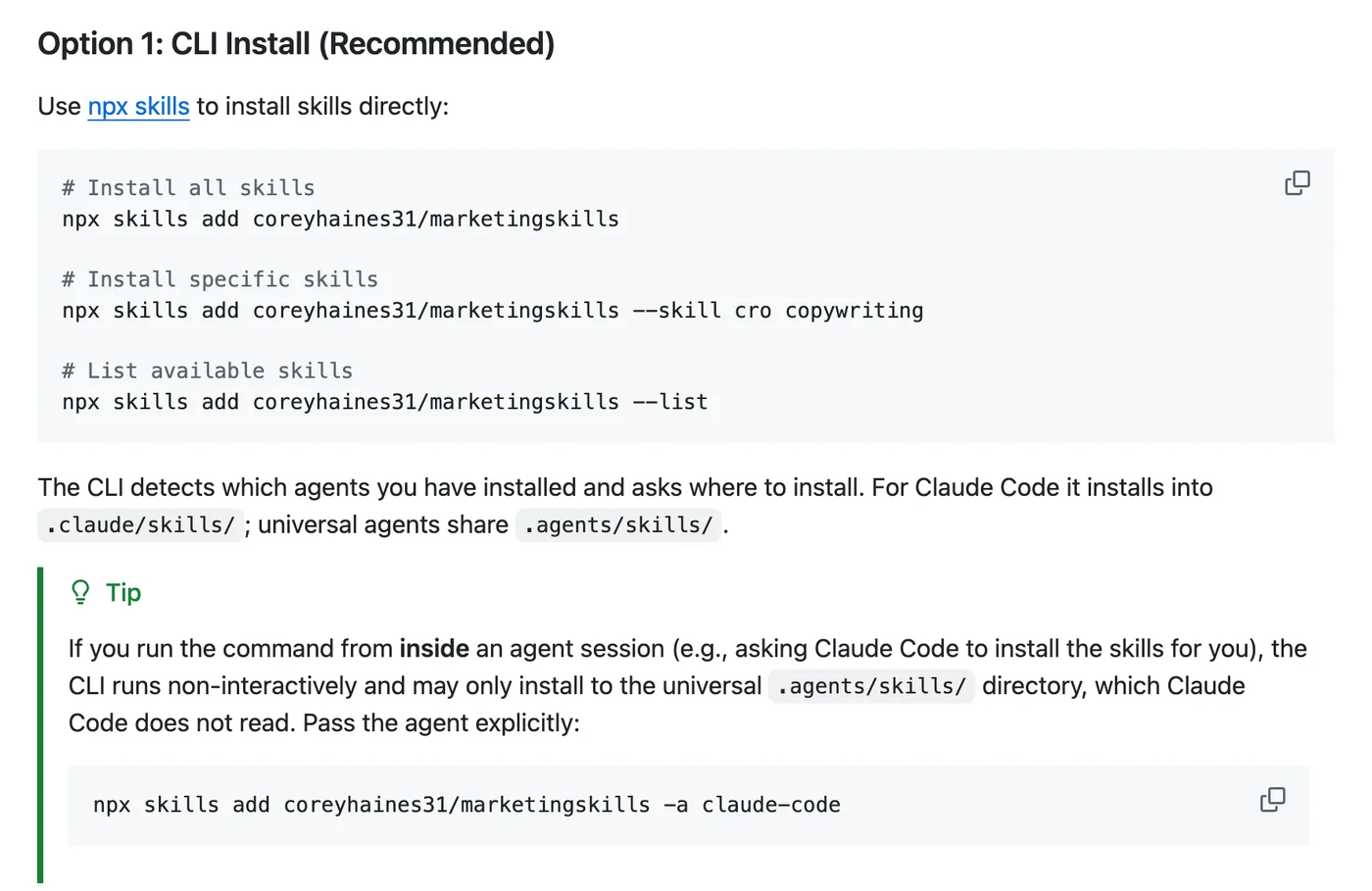
npx skills add coreyhaines31/marketingskills -a claude-code \
  --skill seo-audit schema programmatic-seo site-architecture ai-seo
Keep -a claude-code, or skills may land in .agents/skills/, which Claude Code doesn't read.
Option C: SEOmator's rule-based audit skill
seo-skills/seo-audit-skill checks 398 rules across 20 categories and can gate CI. Install it with npx skills add seo-skills/seo-audit-skill.
Which Claude Code skill for SEO to pick
| Skill | GitHub stars | Best for |
|---|---|---|
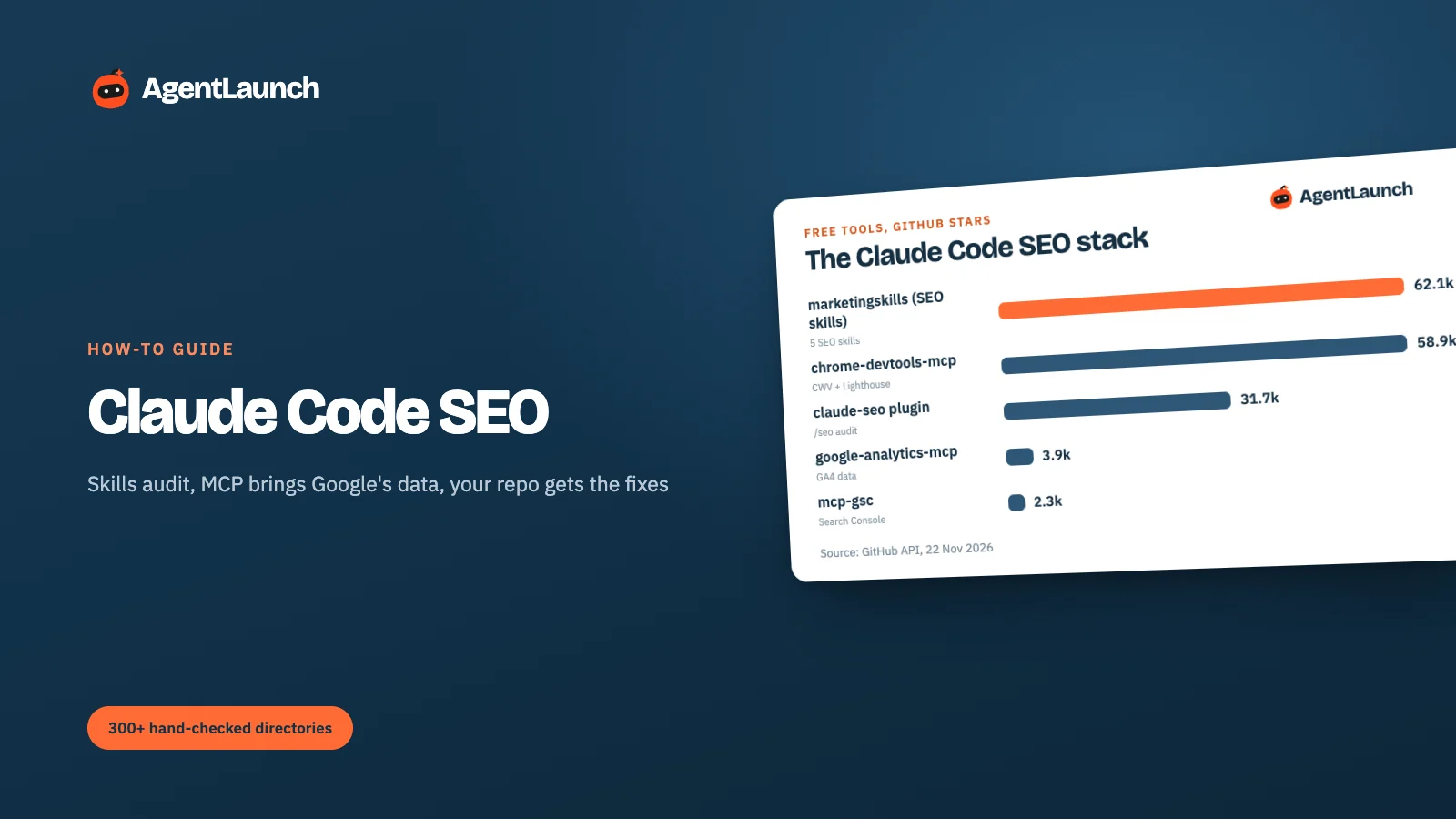
| claude-seo | ~31,700 | Full audits with a plan |
| marketingskills SEO skills | ~62,100, whole pack | Focused fixes in code |
| seo-audit-skill | ~950 | Same rule checks on every deploy |
Read SKILL.md and any scripts/ folder before installing a stranger's skill. Some ship code.
Step 2: Run a Claude Code SEO audit on the pages Google sees
Claude Code sees your live site and the code behind it. So it can trace a missing canonical to the layout file that should set it.
Most vibe-coded apps are React single-page apps, so check the HTML a crawler receives. claude-seo renders JavaScript pages in a headless browser for you.
This prompt works with any of the skills:
Run the seo-audit skill on this repo and on https://yoursite.com.
For every public route, compare raw HTML from curl with the rendered
page. Report routes where the title, description, canonical or H1
only exist after JavaScript runs. List every issue by impact.
Don't fix anything yet.
Keep the last line, so you see the full list before Claude edits anything.
Lovable, Bolt and Replit apps
Run Claude Code on the GitHub repo your builder syncs to. Lovable syncs pushes on the active branch back into the project, so Claude's fixes show up in the editor.
Rendering differs by platform: see our Lovable SEO guide and the SEO checklist for vibe-coded apps.
Step 3: Fix titles, meta descriptions and schema in code
Google wants a concise, descriptive <title> and a unique meta description on every page. It warns against boilerplate titles, yet AI-built apps often ship one title on every route.
List every route with its <title>, meta description, canonical and
og:image. Flag duplicates and empty values. Rewrite each title and
description from the page's own content, with no keyword lists. Set
them in the route's metadata and show me a diff per file.
For structured data, ask the schema skill or /seo schema <url> to validate what's there. Then add types that match visible content:
OrganizationandWebSiteon the home pageSoftwareApplicationon a product pageArticleon posts
Markup for things not on the page is a common audit finding.
Step 4: Generate a sitemap and robots.txt that match your routes
Google's sitemap rules: up to 50 MB or 50,000 URLs per file, absolute URLs, and a sitemap index if you need more. Google ignores <priority> and <changefreq>. It only uses <lastmod> when it's consistently accurate.
Build sitemap.xml at build time from the router and the content source,
not a hand-written list. Absolute https URLs, canonical versions only,
no redirects or noindex pages, lastmod from the real updated date, no
priority or changefreq. Then check robots.txt: allow public pages,
point to the sitemap, and tell me which AI crawlers it blocks.
claude-seo's /seo sitemap and SEOmator can check the result. You'll submit the sitemap in Step 7.
Step 5: Add internal links Claude can find in the code
Google can generally only crawl links that are <a> elements with an href. Buttons with onClick navigation don't count. Google also says every page you care about needs a link from at least one other page.
Claude reads the components, so it can check both at once.
Use the site-architecture skill. Map internal links from the code.
List orphan pages, links that are onClick handlers instead of <a href>,
and vague anchors like "click here". Propose 3-5 contextual links per
orphan page with descriptive anchor text, and add them.
Put links in body text, not a footer block of 40 links.
Step 6: Build programmatic SEO pages without thin content
Claude Code programmatic SEO is powerful and risky. It can generate a thousand pages from a data file in one session.
Google's spam policies call this scaled content abuse when the pages exist to manipulate rankings. One listed example is using generative AI to make many pages "without adding value for users".
So build the gate before the pages:
Use the programmatic-seo skill. Plan a page set from data/items.json.
Each page needs at least 3 facts unique to that item that a user would
want. Add a build-time check that marks failing pages noindex and leaves
them out of the sitemap. Generate 10 pages first and show me the failures.
Review the first 10 by hand. If page 7 teaches nothing page 6 didn't, the set is thin.
Step 7: Connect Search Console and GA4 with a Claude Code SEO MCP
Skills know what good looks like. MCP servers show what's happening on your site.
Google Search Console: mcp-gsc
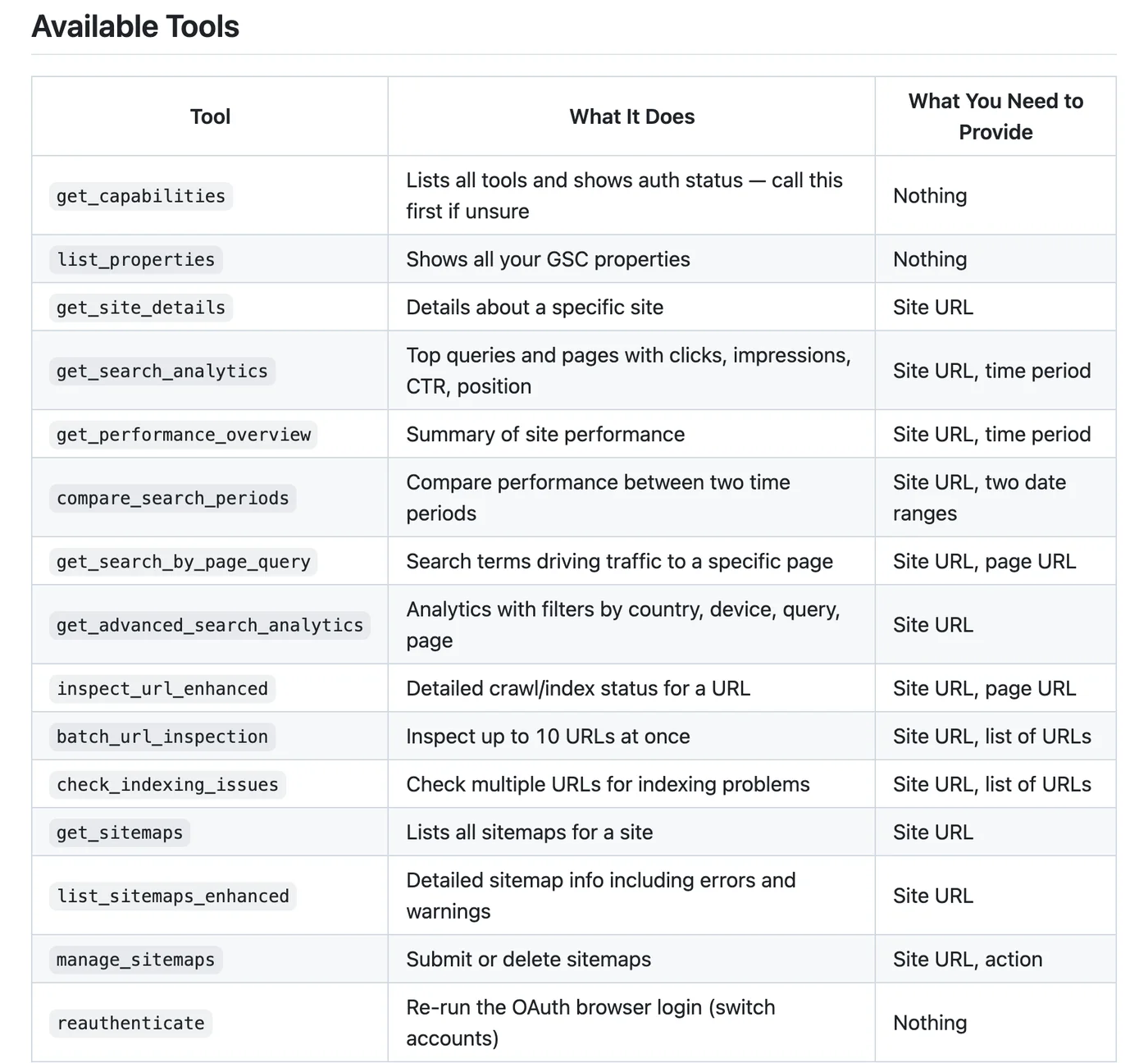
AminForou/mcp-gsc has about 2,270 stars and 20 tools. They include search analytics, period comparisons, sitemap management and URL inspection of up to 10 URLs at a time.
Since version 0.4.2 it's read-only by default. Destructive tools need GSC_ALLOW_DESTRUCTIVE=true. Create an OAuth desktop client in Google Cloud, then add it:
claude mcp add gsc \
  -e GSC_OAUTH_CLIENT_SECRETS_FILE=/full/path/to/client_secrets.json \
  -- uvx mcp-search-console
Google Analytics 4: Google's analytics-mcp
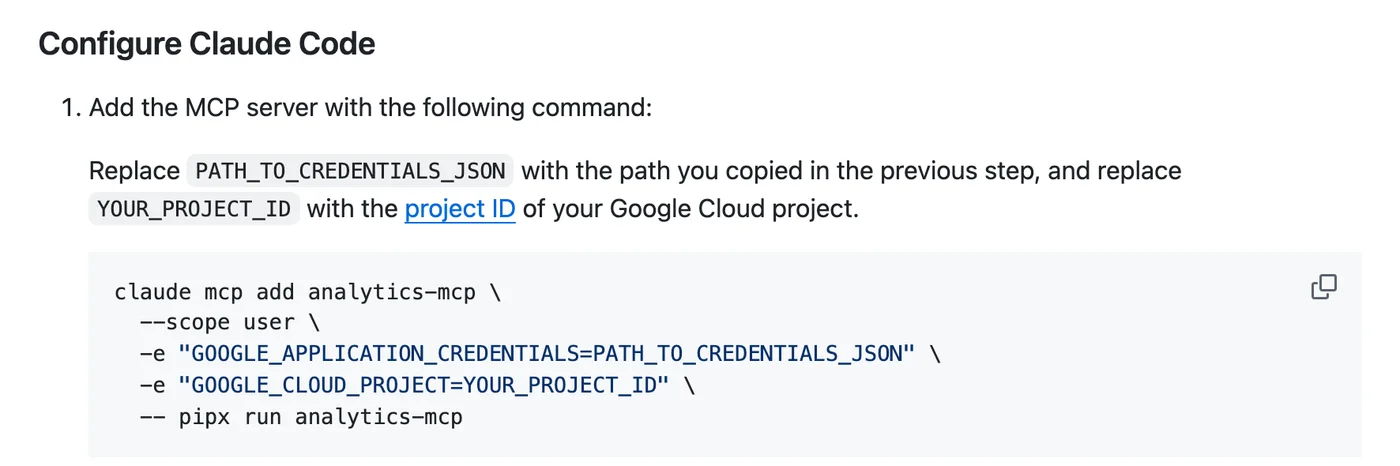
Google's own google-analytics-mcp has about 3,850 stars. It's read-only unless you pass --allow-write.
For keyword and backlink data, DataForSEO runs a remote MCP server at https://mcp.dataforseo.com/v3/mcp on your own API account.
Prompts that use the data
From Search Console, last 90 days: pages with 500+ impressions,
position 5-20 and CTR under 2%. For each, rewrite the title and
description to match the top 3 queries. Diff only.
For indexing, ask Claude to run batch_url_inspection on new sitemap URLs. Crawling can take days to weeks, so check weekly.
Step 8: Check Core Web Vitals with Chrome DevTools MCP
Chrome DevTools MCP has about 58,900 stars and gives Claude a real Chrome with DevTools.
claude mcp add chrome-devtools --scope user npx chrome-devtools-mcp@latest
Two tools matter for SEO:
performance_start_tracerecords a trace to find LCP, INP and CLS problems.lighthouse_auditscores accessibility, SEO, best practices and agentic browsing. Performance comes from the trace instead.
Trace URLs may go to Google's CrUX API, and usage statistics are on by default. The flags --no-performance-crux and --no-usage-statistics turn them off.
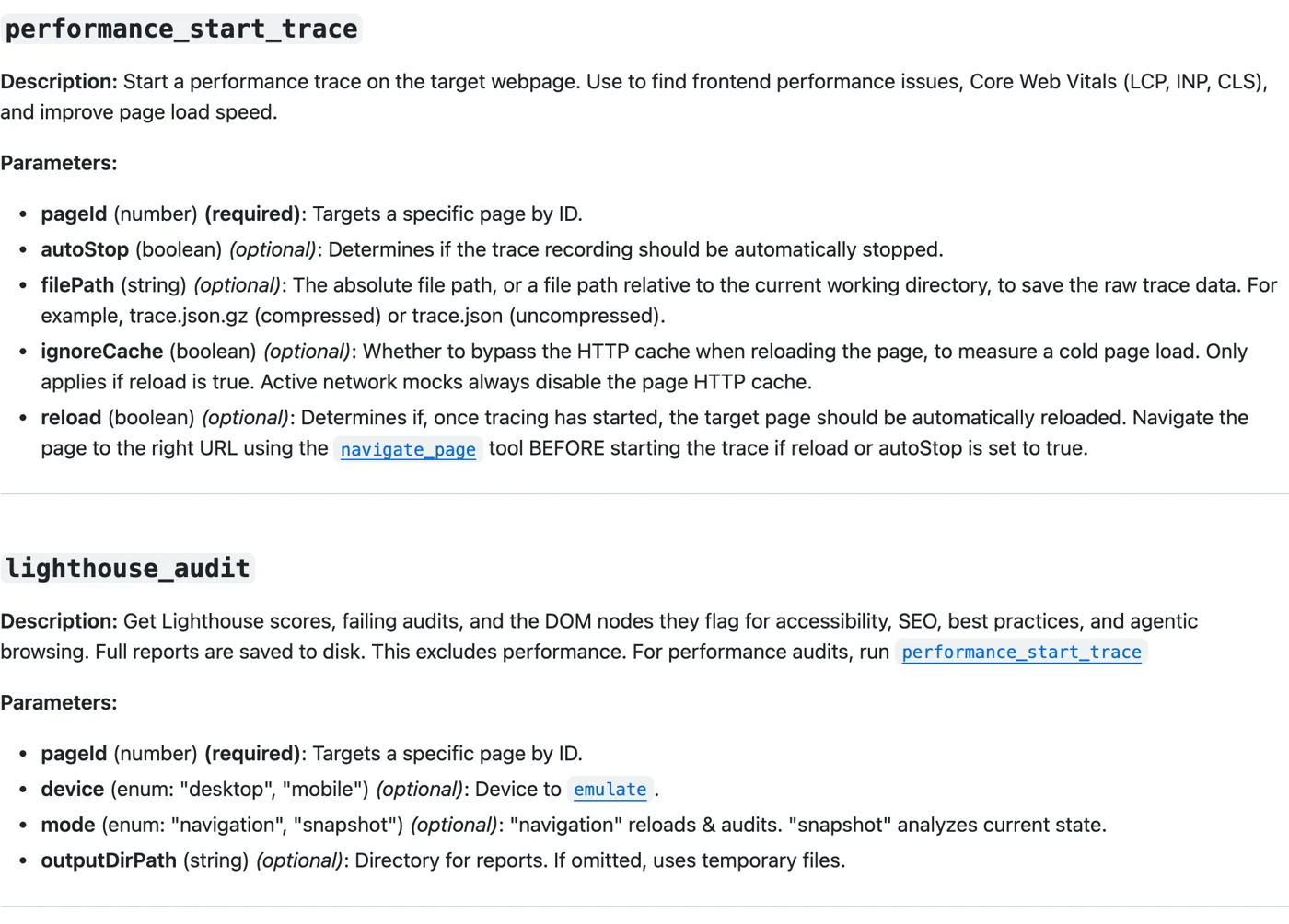
Open https://yoursite.com and /pricing in mobile emulation. Run a
performance trace and a Lighthouse audit on each. Fix the top LCP cause
in code, rebuild, and run the trace again to confirm.
Step 9: Do the off-page SEO job these skills skip
Every tool above works on your own site. None gets other sites to mention you.
/seo backlinks and DataForSEO analyze links, but analysis isn't acquisition. A new site with zero links gives Google little to find it through.
The first links for most new apps come from launch platforms and directories. In the AgentLaunch catalog, 215 of 352 profiled directories give a dofollow link, and 178 are both free and dofollow.
Start with 10–20 in your category, not 100 random ones. Our guides on getting backlinks for a new website and where to submit a vibe-coded app cover the order. The dofollow directory list filters the catalog.
You can run this from Claude Code too. AgentLaunch is a kit you open in Claude Code, Codex or Cursor. It picks from a catalog of 394 directories, writes copy per form and tracks which listings went live.
It fills forms in a real browser and stops for CAPTCHAs, payments and 2FA. Before choosing, check which directories fit your app and look up any site's authority with the free DR checker.
Common mistakes
- Fixing before auditing. Claude fixes the first issue it sees, not the biggest.
- Auditing only the rendered page. A React app can look perfect in your browser and send crawlers an empty
<div id="root">. - One title template for every route. Google's docs call out boilerplate titles by name.
- Programmatic pages without a gate. Generate 10, review, then scale.
- Write scopes you don't need. Keep mcp-gsc and GA4 read-only until you need writes.
- Treating
/seo backlinksas link building. It only reports on links.
What results to expect
On-page fixes ship the same day. Google decides when to recrawl, and requesting a crawl doesn't guarantee indexing. Rankings depend on demand, competition and links, so no skill can promise them.
claude-seo's README says its own site got 10.8K Search Console clicks in its first 12 weeks. That's the author's report, not a typical result. Track your own Search Console data month over month.
FAQ
What is the best Claude Code SEO skill?
claude-seo for a full audit with a plan. The marketingskills SEO skills for focused fixes in code. Both are free and MIT-licensed.
Can Claude Code do an SEO audit?
Yes. With an SEO skill it checks crawlability, metadata, schema, sitemaps and links, then fixes your repo. Chrome DevTools MCP adds Core Web Vitals.
Is Claude Code programmatic SEO safe?
Only with a quality gate. Google treats AI pages that add no value as scaled content abuse. Require unique facts per page and noindex pages that fail.
Is there a Claude Code SEO MCP for Search Console?
Yes. mcp-gsc connects Search Console and is read-only by default. Google's analytics-mcp covers GA4, and DataForSEO adds keyword and backlink data.
Can a Claude Code SEO agent build backlinks?
The SEO skills analyze backlinks but don't get them. Directory listings mean filling forms in a browser, which needs Claude in Chrome, Playwright MCP or a launch kit.
Do Claude Code skills for SEO work with Lovable or Bolt apps?
Yes, if you run Claude Code on the GitHub repo the app syncs to. Lovable syncs pushes on its active branch back into the project.