Field notes
SaaS Launch Demo Video: A 60–90 Second Structure and Script
How to make a SaaS launch demo video: a second-by-second structure, script template, recording settings, the versions to cut from one recording, and where video rules differ (Product Hunt: YouTube only; about 53% of winners had one).
A SaaS launch demo video should be 60–90 seconds and follow one structure: show the outcome in the first 5 seconds, name the problem in one sentence, walk through three steps in the real UI, show one piece of proof, and end with where to try it and what it costs. Record at 1920×1080 or higher, zoom into the interface, and add captions, because many people watch launch videos muted.
Here's a second-by-second structure, a script template, recording tips, and where to use the video.
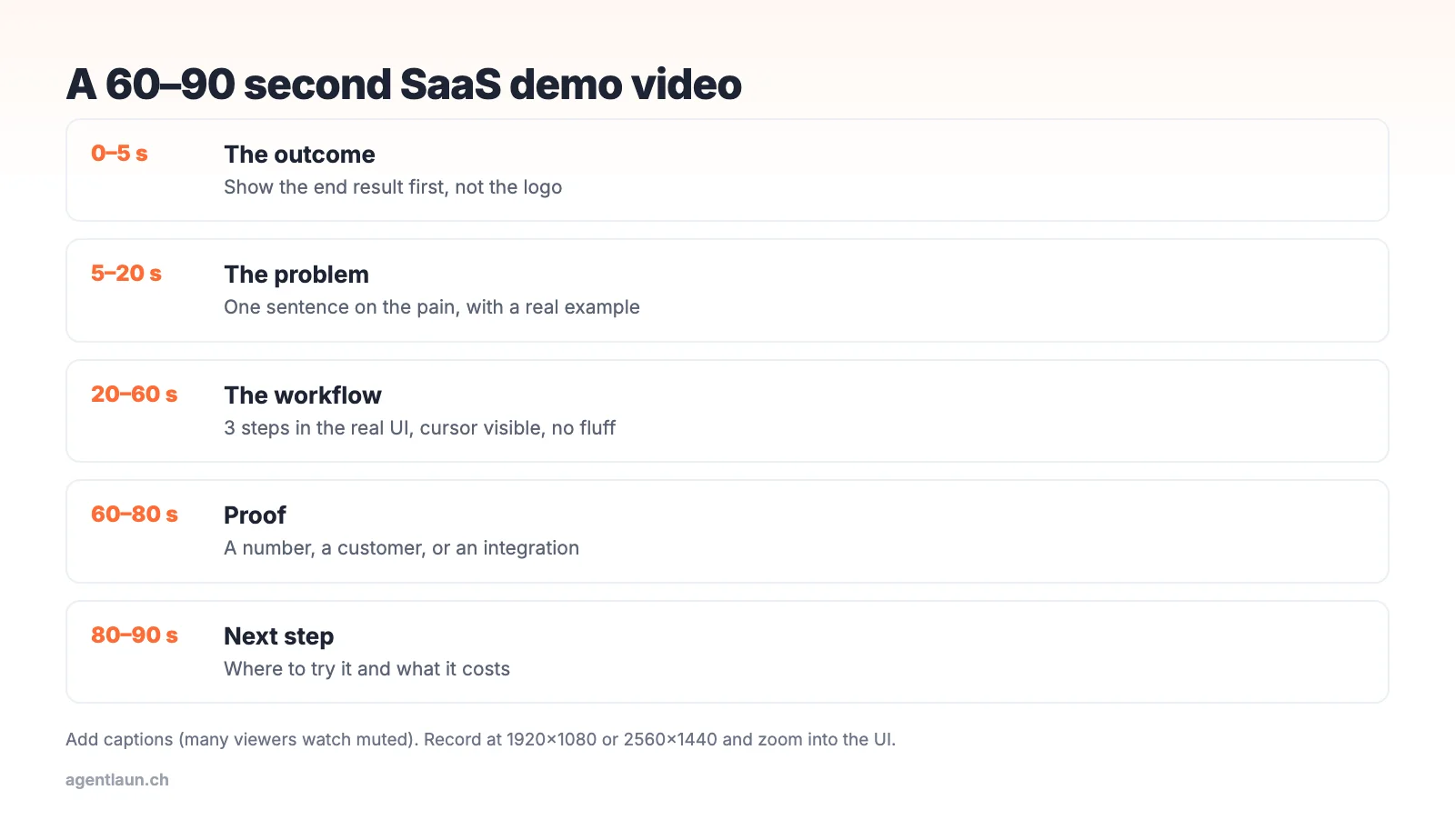
The structure, second by second
| Time | Section | What to show |
|---|---|---|
| 0–5 s | Outcome | The end result: the report, the shipped ticket, the generated image |
| 5–20 s | Problem | One sentence on the pain, ideally with a real example |
| 20–60 s | Workflow | Three steps in the actual product, with the cursor visible |
| 60–80 s | Proof | A number, a customer logo (with permission), or an integration |
| 80–90 s | Next step | URL, free plan or trial, price |
The most common mistake is opening with a logo animation and a "Welcome to…" intro. People leave in the first five seconds.
Script template
[0–5 s, on screen: finished result] "This is a client report that took 30 seconds to make."
[5–20 s] "If you run an agency, you know monthly reporting eats a day per client: screenshots, spreadsheets, copy-paste."
[20–60 s] "With [Product], connect your accounts, pick a template, and click generate. [Show each step.] Add your notes, and send it."
[60–80 s] "Over 300 agencies send their reports this way." (only if true)
[80–90 s] "Try it free at [url]. Plans start at $X a month."
About 150–200 spoken words for 60–90 seconds.
Recording tips
- Use real-looking data, not "Test User 1" or lorem ipsum.
- Zoom in. At 1080p the full UI is unreadable on a phone. Zoom 150–200% on the part that matters.
- Slow the cursor down, and pause briefly on each click.
- Captions: burn them in or upload an SRT. Many viewers on social and launch platforms are muted.
- Audio: a cheap USB mic in a quiet room beats a laptop mic. Or skip the voice and use text overlays.
- No music that fights the voiceover.
Where to use it
| Where | Format |
|---|---|
| Landing page hero | Silent autoplay loop (10–20 s) plus the full video on click |
| Product Hunt gallery | YouTube link (gallery specs) |
| Directories and review sites | Most accept a YouTube or Vimeo URL (submission checklist) |
| Launch emails and social posts | A GIF or a 15-second cut linking to the full video |
| Sales and onboarding | Send to trial users who haven't activated |
Recording settings
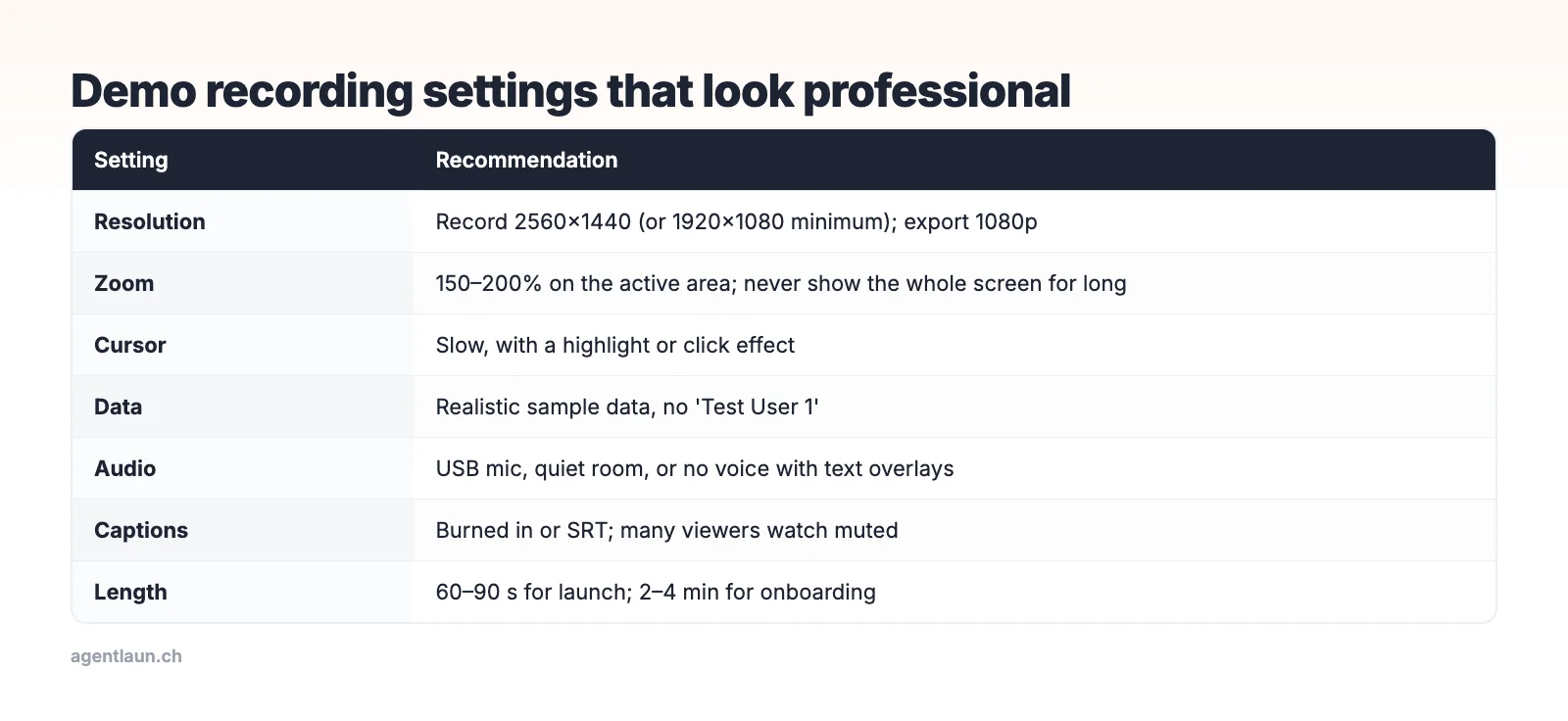
You don't need a studio. A screen recorder that supports zoom and cursor effects (several do this automatically), a USB microphone and a script will get you most of the way. The most visible quality jump comes from zooming in: full-screen recordings of a 1440p display are unreadable when someone watches on their phone in a launch-platform gallery.
Where video rules differ
| Where | Rule or common practice |
|---|---|
| Product Hunt | Optional, YouTube links only (full URL, not private). Product Hunt says about 53% of Product of the Day winners since 2021 had one |
| Directory forms | 14 of 108 forms in AgentLaunch's catalog ask for a demo video, usually a YouTube URL |
| Show HN | No video field; link to a page where the product (or a demo) can be tried |
| Landing page hero | A 20–30 second muted loop, with captions or no voice |
| Sales emails and follow-ups | A 60–90 second version with your voice |
| X and LinkedIn | Square or vertical cut, captions burned in, under 60 seconds |
Record once at 1080p or higher in 16:9, and cut the other versions from it.
Common mistakes
- Starting with the login screen. Start where value appears. Cut the setup.
- Showing every feature. Three steps of one workflow beat a tour of ten features.
- Reading the interface aloud ("now I click the blue button"). Narrate the outcome instead ("and the summary is already in HubSpot").
- Fake metrics in the proof section. Viewers notice, and launch communities call it out.
- No captions. Many viewers on launch platforms and social feeds watch with the sound off.
Versions to cut from one recording
From one 90-second master, cut a 10–20 second silent loop for your landing page hero, a 30-second version for social posts, a GIF of the key moment for emails and launch galleries (under 3 MB for Product Hunt), and the full video for directories and onboarding.
Related
- SaaS launch press kit
- Product launch checklist
- Why launch traffic doesn't convert: a good demo is one of the fixes
FAQ
How long should a SaaS demo video be? 60–90 seconds for launches. Longer walkthroughs belong in docs or onboarding.
What should a product demo video include? The outcome first, the problem, three steps in the real UI, one piece of proof, and where to try it.
Do I need a voiceover? No. Text overlays and captions work well, especially since many people watch muted.
Does a Product Hunt launch need a video? No, it's optional, but Product Hunt says about 53% of Product of the Day winners since 2021 included one. It must be a YouTube link that isn't private.
How long should a SaaS demo video be? 60 to 90 seconds for launch platforms and directories, 20 to 30 seconds for a landing page loop.